
 Print View
supplierservice@globalsources.com.
 Global Sources Direct Order is now available! New!
29 Oct 2020
-
Global Sources Direct Order service is now available which allows buyers to source for your product, place an order and pay for it securely – all through the convenience of the Global Sources App.
- 1. Onboard payment account
- Currently, receiving payments from Direct Order can only be done through a PayPal account.
- Setting path: Settings ➜ Payment Settings (Only open to Super Administrator)

- Click the “Set Up Now” button and follow the instruction to complete the onboarding process. If you have previously set up a PayPal account for Sample Order, this process is still required.
- 2. Set “Yes” to enable Direct Order
- There are two ways to do this.
- (Note: only products with specified FOB price based on quantity can be enabled for Direct Order)
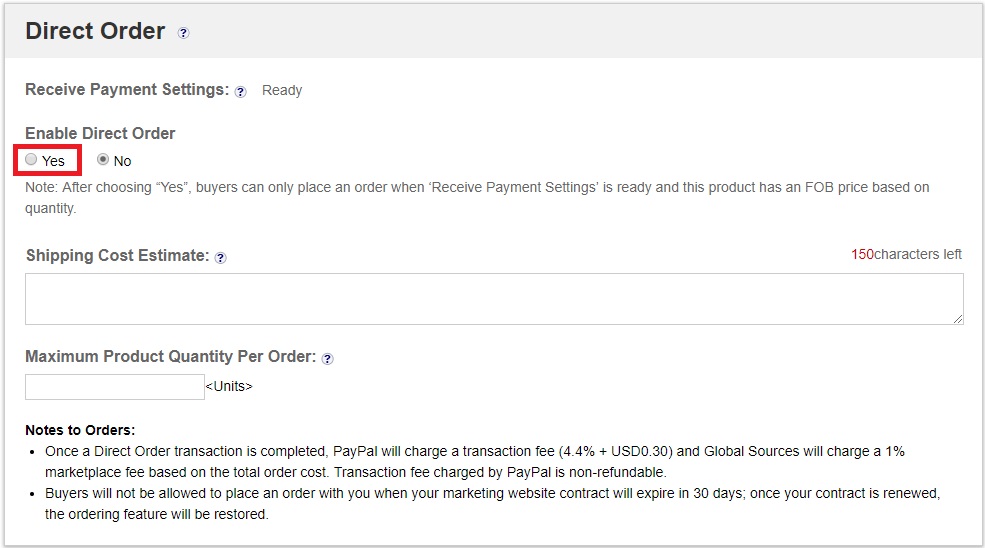
- 1) Enable for one single product: Select “Yes” for the ‘Enable Direct Order’ field in the newly added Direct Order section of product profile, then confirm the selection. Make sure to submit the product to reflect this change online.
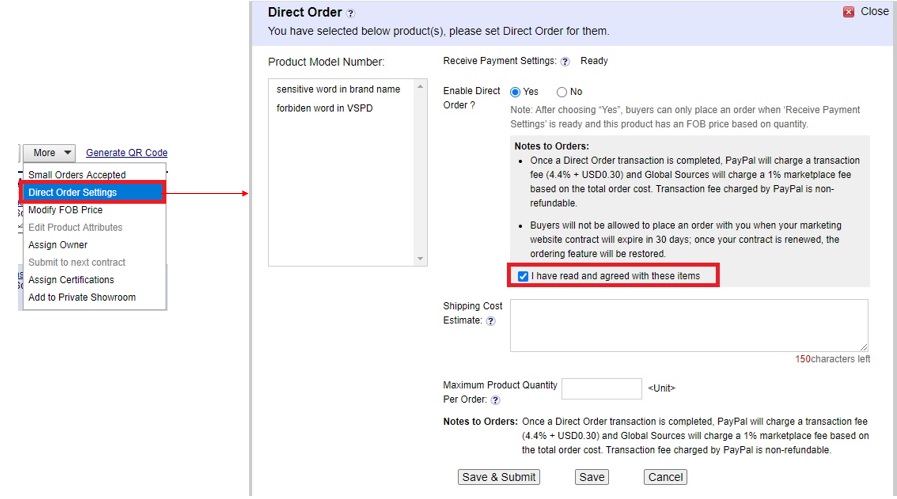
- 2) Enable by batch: Select products in the product list page and click the ‘Direct Order Settings’.
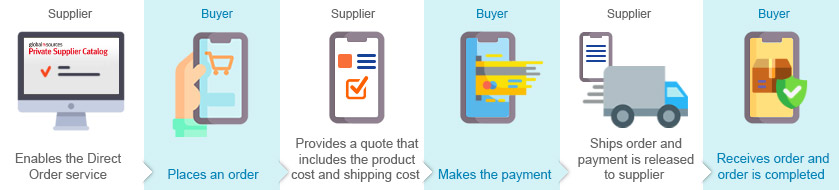
How do you enable the Direct Order service?
You need to complete the onboarding process for your payment account on PSC.
 Re-design Marketing Website - Better user experience
Oct 14, 2020
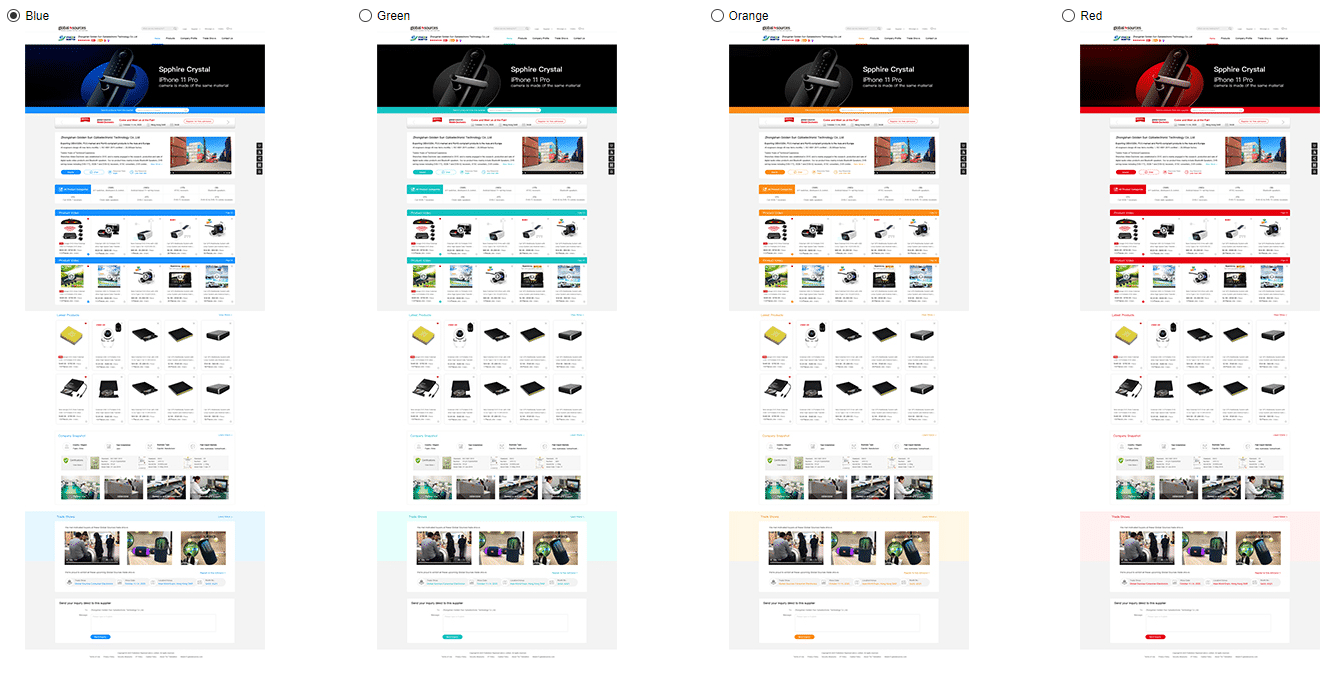
1. New UI design is more modern and attractive
2. 4 color themes available to suppliers
3. Display 260 x 260px product images – bigger and more eye-catching
4. Display company video and past Global Sources trade show video directly on the homepage
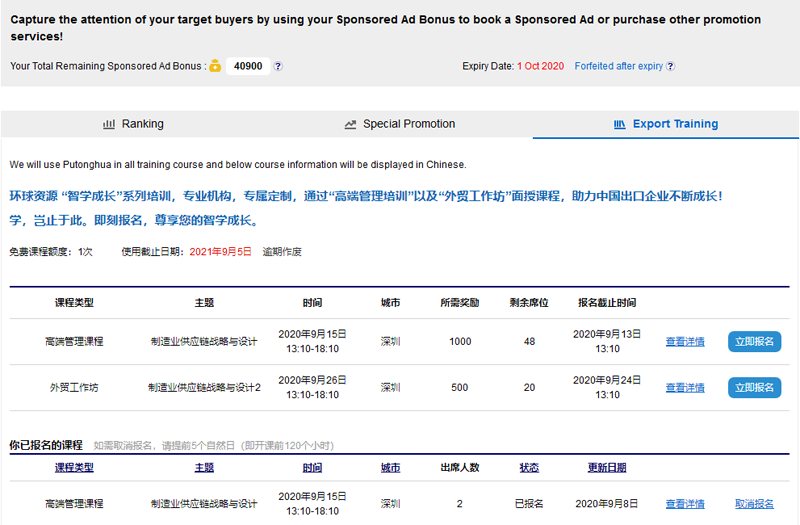
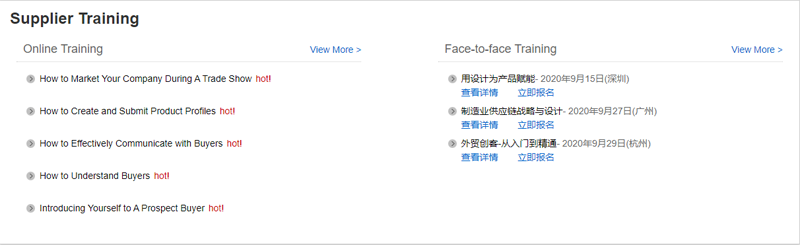
Sign up online for an Export Training course!
Sep 10, 2020
Suppliers who use online promotion tools can enjoy a FREE Export Training course during their contract period.
Just go online and sign up for your free course to get insight into the latest trends and expand your business opportunities. Hurry – slots are limited!
Start bidding for Buyer App ads!
Aug 31, 2020
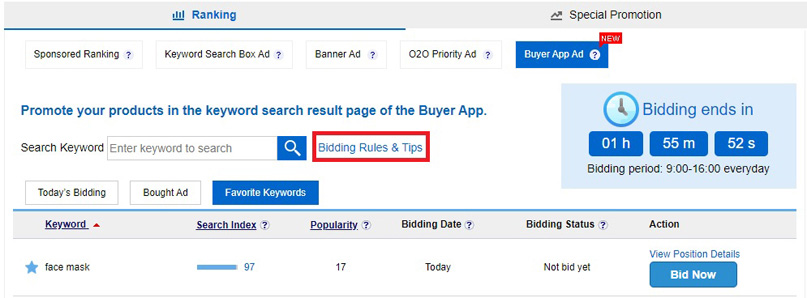
Make a bid:Promotion and Service >> Ranking >> Buyer App Ad
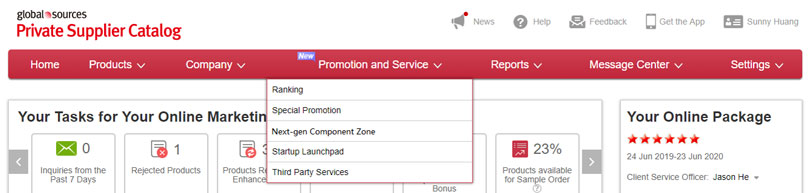
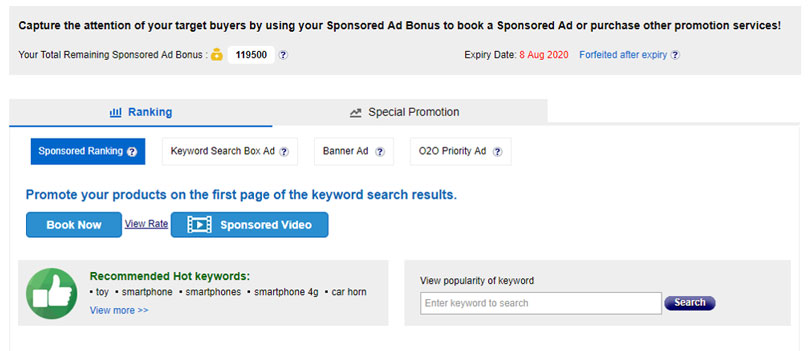
Enhancements on the Main Menu and 'Manage Rankings' page!
Jun 16, 2020
Main menu:
'Manage Rankings' page:
 Online Chat Feature is Upgraded
Jan 20, 2020
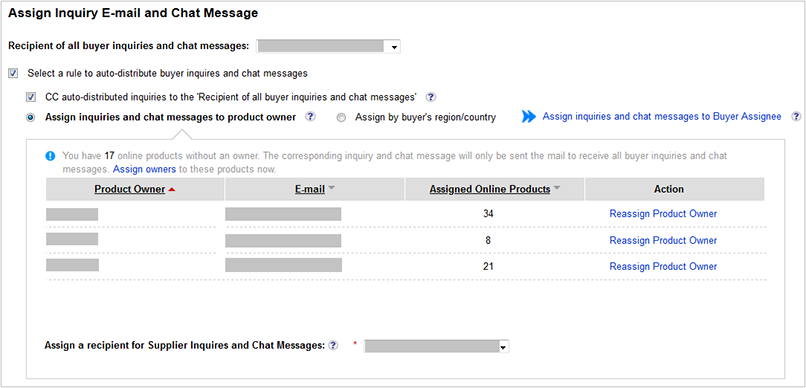
Just login to Message Center or supplier app to check buyers’ new messages!
[Assign Inquiry E-mail and Chat Message]
Path: Settings>>Website and E-mail Settings>>Buyer Inquiry E-mail and Chat Message (Super administrator only)
Smart Editor enhancements!
Jan 3, 2020
It’s easier than ever to replace your products!
Nov 1, 2019
Note: The ‘Replace’ related functions have been removed from the Marketing Website folder
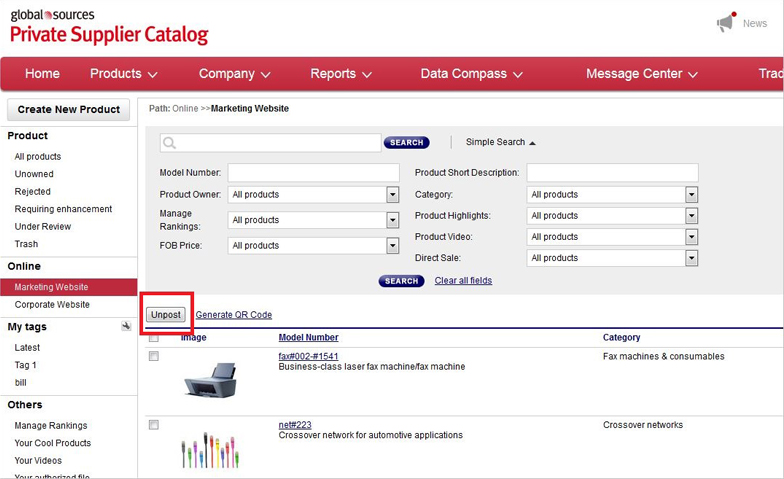
Introducing the new O2O Priority Ad!
Sep 2, 2019
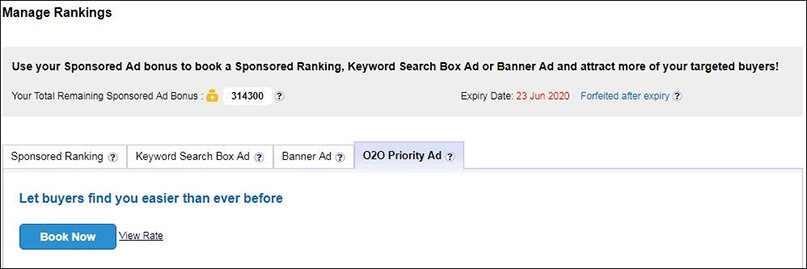
Online booking for Value-Added Services – now available!
Aug 16, 2019
Want to know more about these marketing and business opportunities? Click here for more details! (Super administrator only)
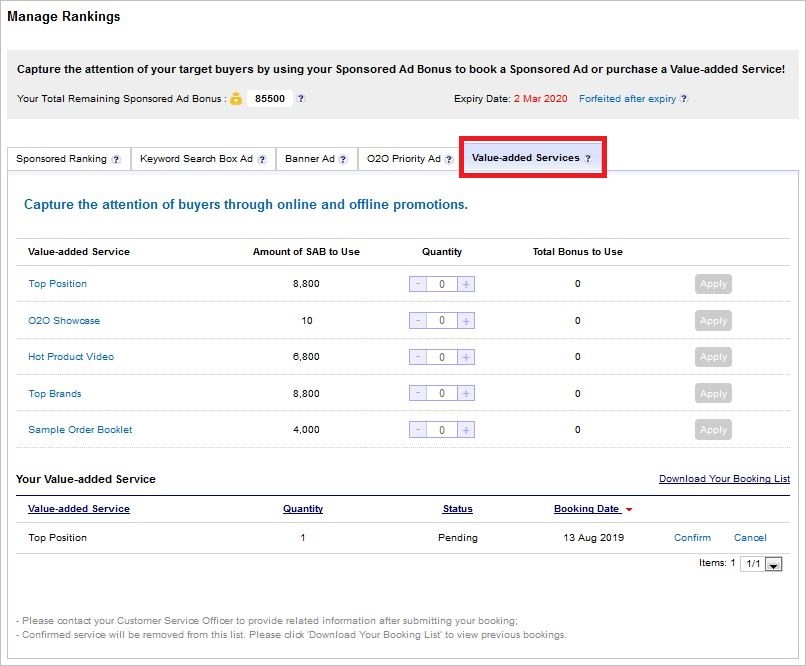
Path:Private Supplier Catalog>>Manage Rankings>>Value-added Service
Generate your backup codes to protect against unwanted system access!
July 25, 2019
verification code on mobile phones.
Simply go to ‘Private Supplier Catalog>>Settings>>User Profile and Password Management>>Security Settings’ and generate your backup codes!
Sample Backup Codes
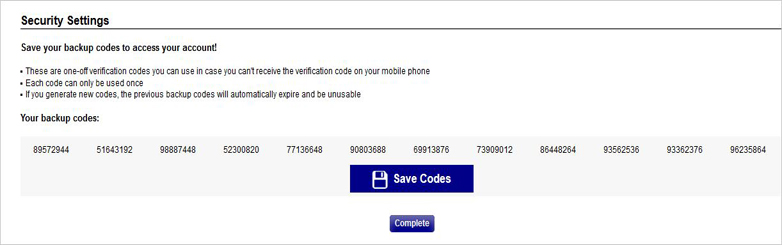
Using the backup code to access system
Display product scores in real time – capture the attention of buyers!
June 4, 2019
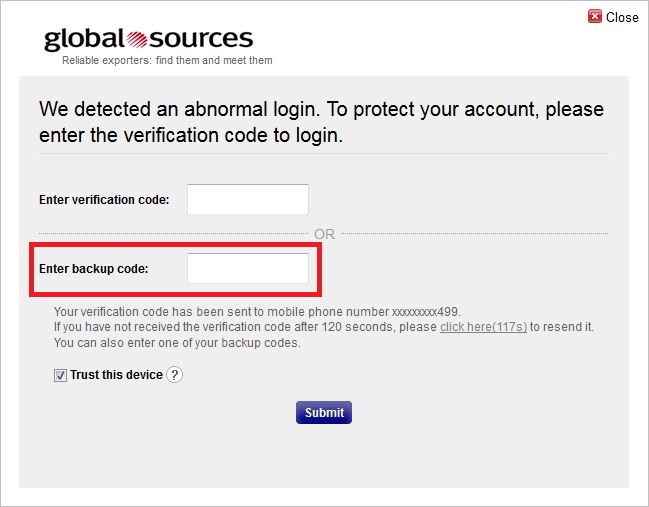
The “Product Information Score” column has been added to the Create/Edit Product Profile, to reflect the completeness of your product information – in real time.
This means that the higher the score of your product, the more attractive it becomes to the buyer and the closer you get to winning their business!
Enhanced chat feature to give users a new experience!
May 23, 2019
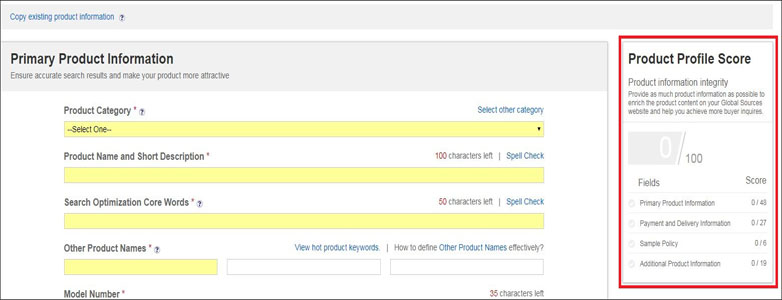
• It features a brand new interface, that’s more modern and visually appealing.
• The new chat box also displays the number of unread messages, as well as allowing to add new message reminders and download chat history -- all to help users keep track of their conversations.
• Chats can now be initiated in more channels as we’ve inserted the button in the buyer mobile site and more desktop pages.
Sample Order Upgrade
Apr 12, 2019
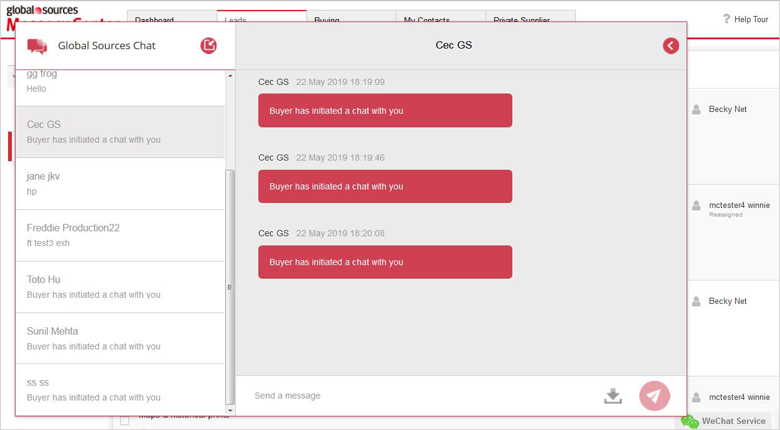
We’ve upgraded Global Sources’ Sample Order feature and now enables suppliers to keep better track of their orders.
Sample Order opens even more business opportunities for you. It’s super easy, so come and join us!
If you want to activate your sample order service, please contact your Client Service Officer.
Screenshots:
Go to ‘My Orders’

View your orders

Chat online with buyers

Homepage upgrade—Redesigned to be more efficient and convenient!
Mar 27, 2019
The Private Supplier Catalog homepage has been redesigned and upgraded. It’s now more efficient and convenient for you to rollout your promotions!
• The homepage is more colorful and features a responsive design that adapts to your screen to give you a better visual experience
• Your Tasks for the Trade Show is a new section to give exhibitors an overview of what they need to do to enhance their trade show promotion
• Recommended Trade Shows has also been added for online-only suppliers to get key show information and quickly access booth consulting services
• Your Performance is a new section which shows the impact of your promotion activities and gives you an idea on how to enhance your marketing
Screenshots:
Your Tasks for the Trade Shows

Recommended Trade Shows

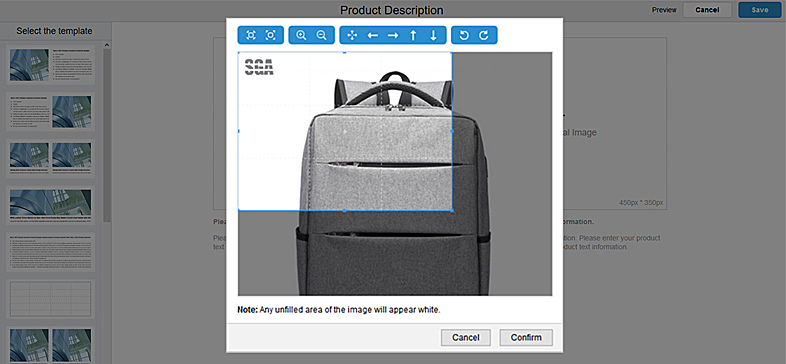
Newly added smart editing mode: open the door to the personalized product information era
Feb 26, 2019
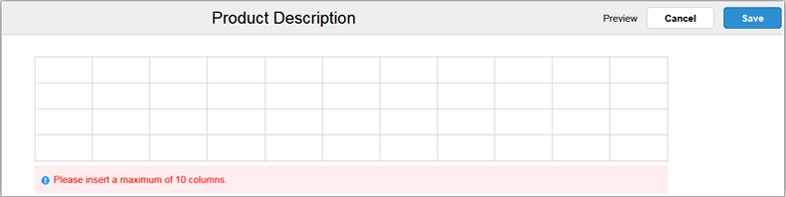
Smart editing mode has been added to the product profile page to facilitate suppliers in selecting different templates and editing their personalized product information freely.
Features of smart editing mode:
• One-click template selection - click the template to edit the product information directly.

• Diversified templates - 12 types of templates with photo/text/table can meet every type of requirement.

What are you waiting for? Click on the product information to go to the Create/Edit Product Profile page and set up your personalized product!
New product carousel: the new feature for increasing product exposure ---- We have just launched a new product rotation feature that will provide you with further assistance in attracting buyers.
Dec 12, 2018
Want to give exposure to many of your new products in the most eye-catching way? Want to show your prospective buyers something new? Try our brand new feature right away and set up bound products for your Sponsored Rankings, and you too can take pole position in the sales race, while expending the minimum time and energy.
Try the new product rotation feature right away and seize this amazing opportunity to expose your products to the world! (Applies to Master accounts only).

Generate your online sample QR code quickly
September 20, 2018
The October exhibition is just around the corner, and participating exhibitors can include their QR code in the product catalog and brochures. They can also print out their QR code and place it in their exhibit. Generate your sample order QR code right now!
Please note: this feature is currently available only to suppliers subscribed to our ‘sample order’ service. If you have any questions, please contact your customer service officer directly.


View your Sponsored Ad Bonus balance and transaction history via a newly expanded display format.
September 20, 2018
Want to know the detailed usage of your Sponsored Ad Bonus? Good news, we have optimized the Sponsored Ad Bonus balance display format and expanded the balance information, providing a full transaction record, to allow for easy viewing of your current balance and transaction history. Click now to take a look!


Note: Records of the balance transaction history go back to March 14, 2018.
Launch of “Your Videos” feature ---- manage your videos yourself
August 1, 2018
Now you can upload and manage your product and company videos yourself using the Your Videos feature. It makes it quick and easy for you to update video content and post it online. Your products will get better exposure and wider promotion on GlobalSources.com when you use the new video service!
Path: Products/Your Videos (Note: Videos will be audited before upload to GlobalSources.com)

Launch of Sponsored Ranking for 9-12 Rows on GlobalSources.com
August 1, 2018
Sponsored Ranking for rows 9-12 is now available for booking; try it and you will find it is another cost-effective way to promote your products. Make a booking now!
Path: Products>Manage Rankings (Note: Only the Super Administrator can view and manage Rankings.)

Now available: The new Banner Ad feature —— Let buyers see you on every page!
July 18, 2018
The new Banner Ad feature ensures that your product appears on every page of search results on GlobalSources.com. Buyers are sure to notice your product in a banner ad. Hurry and book one now! Highlights of the new feature:
Go to the management page and book now! (Note: only available to Super Administrator)

Exclusive feature for exhibitors! Apply for Your At-show Cool Products.
July 18, 2018
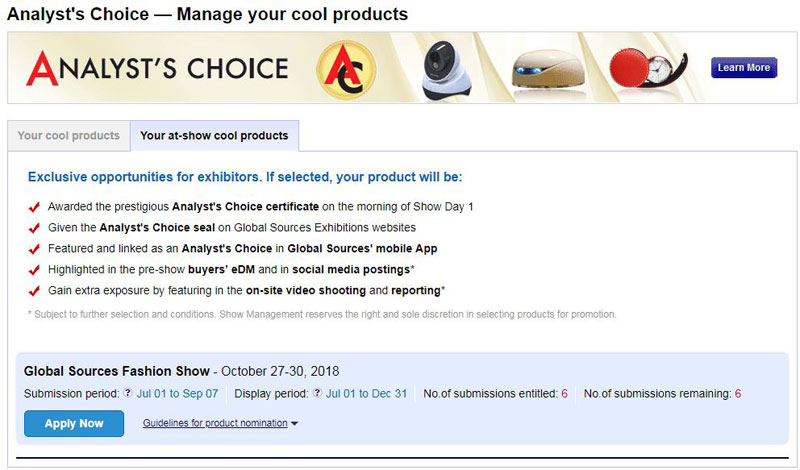
Global Sources exhibitors now have exclusive opportunities to apply for At-show cool products. The at-show cool products will not only be promoted on GlobalSources.com, but also enjoy a lot of exposure with promotion directed at on-site buyers during the exhibitions including:
* Subject to further selection and conditions. Show Management reserves the right and sole discretion in selecting products for display and promotion.
Attract buyers' attention both online and offline and benefit from the extra promotion. Use the self-service application function instead of manually filling out the application form offline! Click here to go to the application page.
Implemented Notification feature on GlobalSources.com
May 9, 2018
A new “Notification” feature on the GlobalSources.com website provides floating alerts and notification panel functions to remind you of new messages, including suppliers’ replies to Requests for Information or Quotations, and buyers’ newly-posted Requests for Information or Quotations.

Live “Chat” feature now available on GlobalSources.com!
May 9, 2018
The new live “Chat” feature is now available on GlobalSources.com. It provides buyers and suppliers a reliable system for real-time conversation.


Keyword Search Box Ad Updates ---- Let every buyer see you!
May 3, 2018
Are you still in a hurry to get a Sponsored Ad position for your product? Want the buyers to see your product on first viewing? The Keyword Search Box Ad is now fully open for booking!


You can use your Sponsored Ad Bonus to book Keyword Search Box Ads directly. Do not miss this great opportunity!
Click here to go to Manage Rankings page and start booking.
New “Buyer Credit Pre-check” service added in Message Center!
March 28, 2018
Want to know the credit worthiness of potential customers? Register for Buyer Credit Pre-check service provided by Euler Hermes in 2 simple steps!


(Please refer to the following partial screenshot for Buyer Credit Pre-check request form)

Enhanced Sponsored Ad functionality! The new booking mode helps you to use the bonus flexibly and maximize the benefits from your promotion.
March 14, 2018


Handling Sample Orders! New functionality helps you fill in sample order details more efficiently.
March 8, 2018
Buyers often request sample orders, and our new function makes adding sample order items in the Create/Edit Product Profile page quick and easy for you. Just fill in Sample Costs, Shipping Costs and Sample Order Descriptions; buyers see these details on GlobalSources.com and order samples. The more sample orders you get, the better the chances for you to get orders.

New function for O2O suppliers: Manage O2O Showcase Products function launched
February 28, 2018
Global Sources O2O suppliers now get extra exposure for their products. The products are displayed in a special O2O Showcase section on GlobalSources.com. Instantly attract buyers' attention by displaying products in this section, which appears in the first screen of GlobalSources.com!
Entry point: Products/ Manage O2O Showcase Products

Launch of 7th and 8th Row Sponsored Ads on GlobalSources.com
January 2, 2018
Following successful introduction of Sponsored Ads in the first six rows of search results, Global Sources is now opening up slots in the 7th and 8th Rows!
This gives you more opportunities and greater choice for promotion of your products. Do not hesitate; book a slot quickly before they are all gone!
Entry point: Products>Manage Rankings (Note: Only the Super Administrator can view and manage Rankings.)

We strongly recommend the new and time-saving “My Contacts” buyer management system!
November 28, 2017
Use 7 key features in “My Contacts” to manage buyers that have contacted you through GlobalSources.com or at Global Sources Exhibitions.
Entry point to My Contacts: at the top of the MessageCenter homepage.
Click here to view detailed guidelines.
Screenshots:
Buyer list page

Buyer details page

Auto-recommended Hot Keywords feature helps you quickly identify hot keywords.
November 21, 2017
Are you still struggling with what keywords to reserve? Our system can now auto-recommend hot keywords based on your online products, helping you pick relevant hot keywords quickly and easily.


Newly added batch FOB price modify function on Product list page, quickly and efficiently modify product FOB prices.
October 18, 2017
Enhanced the Advanced Search/Filter feature on the product list page, adding a 'Modify FOB Price' button. Now you can quickly filter products that do not have FOB price and add FOB prices for them in one batch.


Significant enhancement to Trade Shows page! Upgraded trade show video function is waiting for you to experience.
October 10, 2017
Now you can select any 5 Global Sources Exhibitions that you’ve participated in, and upload up to 6 videos and up to 4 photos from each of the 5 shows. These multimedia presentations will attract buyers’ attention and strengthen their trust in your company’s capabilities. Use this enhanced function now, an exclusive feature for O2O suppliers!

Add “Your performance at the show” report and push notification of scanned data, reminding exhibitors to pay close attention to scanned data.
August 30, 2017
Want to know what data was scanned by you at the Global Sources Exhibitions? Wonder how many buyers your peers had close contact with during the show? Now, you can keep track of your exhibition dynamics through the newly added “Your performance at the show” reports in Reports and through push notification during the show.


Launch of 5th and 6th Row Sponsored Ads
July 17, 2017
Global Sources has just launched Sponsored Ads for the 5th and 6th Row of search results. If you missed out on booking the first four rows of Sponsored Ads for a popular keyword, this is your chance to book the 5th and 6th rows. Don’t miss out again!
Steps for booking the 5th and 6th Row Sponsored Ads are the same as with the first four rows. It’s now or never, so act now! Click “Manage Ranking” in the “Products” menu immediately to book the best positions!

Note: Only the Super Administrator can view and manage Rankings.
Enhanced “Small Orders Accepted” section!
June 14, 2017
To help buyers accurately identify products that can be ordered in small quantities and communicate this efficiently, a "Small orders accepted" setting option has been added to the product page in your Private Supplier Catalog. Now you can individually set up whether to accept small orders for each of your different products.
• You can set this on the product information page of your Private Supplier Catalog.

• A newly-added batch modification button on the product list page allows you to easily modify product information for many products.

Notes:
• If you select “yes” in the setting for “Small orders accepted” for a product in Private Supplier Catalog, it will be displayed with "Small Orders: Accepted" on the Product Details page of Globalsources.com. If you selected “No”, the Global Sources page will not display this information.

• Buyers will now see search results based on product-level settings when they filter for “Accepts Small Orders”.

New Benefit for Exhibitors: Upload photos/videos to past Global Sources trade show details
April 24, 2017
Exclusive enhancement for O2O suppliers: Now O2O suppliers can upload photos/videos to their past Global Sources trade show information, making them more attractive and gaining buyers’ interest and trust.
• Suppliers can upload photos/videos in the ‘Trade Shows’ section for a maximum of 5 latest Global Sources Exhibitions attended.
• Suppliers can upload up to 4 photos and 1 video for each attended Global Sources trade show.

Path: Company/Trade Shows
Launch of 4th Row Sponsored Ads online!
March 2, 2017
If you missed out on booking a Sponsored Ad for a popular keyword, you now have another chance with the launch of a 4th Row of Sponsored Ads. Make the most of this opportunity to target qualified buyers by using this new Global Sources service.
Steps for booking a 4th Row Sponsored Ad are the same as with the first three rows. Remember, it is first-come first-served, so act soon. Click “Manage Ranking” in the “Products” menu now to book the best positions!

Note: Only the Super Administrator can view and manage Rankings.
Newly Manage Rankings has been launched!
Dec 15, 2016
Sponsored Ad - Attract more targeted buyers through this brand new Global Sources service!
• Promote your products in the first 3 rows on the keyword search results page - 4 products per row.
• Different positions get you different levels of visibility, with different dollar values.
• Book your exclusive ad position using your Sponsored Ad bonus now. Your marketing results, your control!

Click "Manage Rankings" in the "Products" menu now to book the best positions!
Note: Only the Super Administrator can view and Manage Rankings.
Allows you to set the display order in Product Highlights, now much easier to promote your key products!
Aug 31, 2016
You can now adjust the display order in Product Highlights by simply dragging and dropping products in place, making it quicker and easier to promote your key products.
