
 Print View
supplierservice@globalsources.com.
 Learn about other services that help you attract, screen and meet quality buyers
19 March 2009
-
The homepage now features more information on services that can help you expand your business. In addition to third-party verification services, you can learn more about how to meet buyers face-to-face at Global Sources' Private Sourcing Events and China Sourcing Fairs.
 Homepage - monitor key product profile counts
 6 March 2009
-
A redesigned "dashboard" now provides even more tracking information on your product profiles and other items. This means you can easily monitor the number of products:
• On your Marketing Website (Online)
• In your full catalog (Created)
• In process and pending approval (Submitted)
Each count has a corresponding link that will take you to the relevant folder, allowing you to easily update your product catalog.

In addition, you can keep an eye on your number of available postings to make sure you're maximizing your exposure to buyers, or to know when to increase your posting limit. And if you're a Super Administrator or Administrator, you can also come here to check for unread buyer inquiries.
Product Profile Status "dashboard" for Super Administrators/Administrators
 Homepage - your marketing website now just one click away
6 March 2009
-
The new Your Website menu allows you to go directly to your Global Sources Marketing Website from any page in the Private Supplier Catalog.
 Homepage - know your ranking
6 March 2009
-
Your company's Global Sources Online ranking is now prominently displayed on the homepage for easy reference.
 Product Highlights - more flexibility, more control
11 February 2009
-
You now have greater control over the Product Highlights section on your marketing website homepage.
Go to the Main company profile section to set the maximum number of Products Highlights to display: 6, 12, 18, 24 or 30.

On the Product Profile page, products are automatically set to "Yes", as shown below, meaning they will appear on the homepage. Change the setting to "No" if you do not want a product featured.
 Free online training programs - expert guidance, practical advice
15 January 2009
-
Want expert advice on trade show preparation? Or tips on how to improve your replies to inquiries? Our new online training programs provide all of this and more. Conducted in Mandarin, these courses are available to Global Sources' Verified Suppliers in mainland China, Hong Kong and Taiwan at no charge. Simply click on the Online Training link under the Services menu, and learn how you can take your business to the next level.

 New homepage buttons - one-click access to your key functions
15 January 2009
-
When you log in to the homepage, prominent new buttons put the functions you need most just a click away. Create New Product and Submit Products buttons take you straight to your most important work. And for the Super Administrator and Administrator user roles, a View Inquiries button gives you direct access to your latest sales leads.
Homepage for Super Administrators/Administrators:

Homepage for other users:
 Submit products - simplified confirmation process
15 January 2009
-
You can now submit your products to multiple websites at once - without confirming each destination one by one.
Company profile sections - submit immediately after saving 15 January 2009
-
Submit all company profile sections - including the Vendor Profile form - immediately after saving, without having to return to the Company Profiles folder.
 Select category from Product Profile page - Work simpler and faster
07 January 2009
-
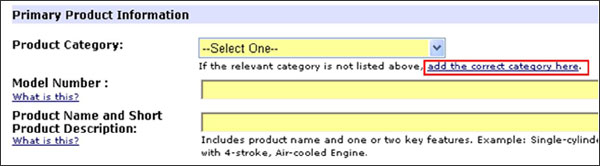
Adding product categories from the Product Profile page is more straightforward than ever. If you need a category that is not already in your pick list of pre-set categories, click the "add the correct category here" link to open a separate search window.
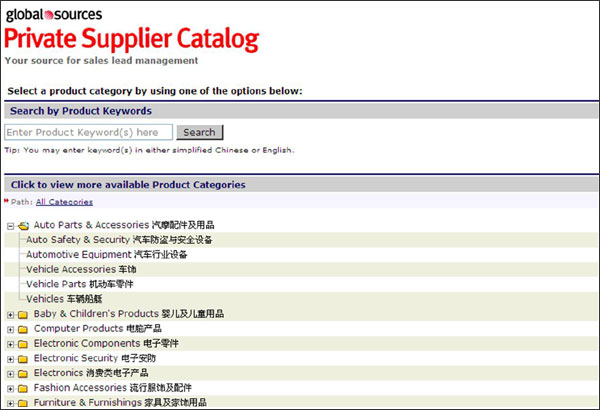
You have two search options - search by product keyword or search by browsing sub-categories (see update below). When you select a category, it will be added to your Product Category List and displayed in the category field in the Product Profile you are editing. The search window will close automatically, and you can continue editing your product information.
 Search for product category by sub-categories - fewer steps, greater accuracy
07 January 2009
-
It is now easier to search for product categories by browsing different levels of sub-categories. The process has been reduced to two steps from four, cutting your search time in half. Moreover, for more efficient searching, you can now click any category with a plus sign (+) to expand the related sub-categories, or collapse categories with a minus sign (-). This lets you browse more related categories at one time, meaning you can find and select the categories you need more accurately.
 Add/remove product categories - clearer design, easier maintenance
07 January 2009
-
We have adjusted the location and design of the functions for adding and removing product categories to make them clearer and easier to use. To add categories, click the easy-to-find "Add more" link located at the top of the Product Category List. The "Remove" button has been placed closer to your selected categories for easier and clearer access. Select the categories you don't need, and click to remove.
 Main menu - more convenience, no confusion
09 December 2008
-
Based on user feedback, we have made a few small changes to the main menu to offer clearer, more convenient navigation in the Private Supplier Catalog.
Longtime users will notice that section titles are no longer clickable, to ensure that users do not unintentionally click through before the section menu appears. At the same time, we have more clearly integrated the "Home" link under each section as one of the menu options. For example, to go to Products Home, simply move your mouse over Products on the main menu and click Products Home when the menu appears.
 One-click access to Product Categories and Add New Contact
09 December 2008
-
You can now access your product categories and add contacts directly from the main menu:
 User role - learn which functions you can use
 09 December 2008
-
You can now easily find your user role following your name in the upper right corner of every page. Click on your role to see a complete list of the functions available to you and to other user roles.

 Product Profiles folder - key information at a glance
01 December 2008
-
We have reorganized the Product Profiles folder to give you the information you need faster. You can now see more columns at once, and product images are displayed prominently on the left. In addition, when you move your mouse over the product status icon, a label displays to indicate whether the product is Editable, Read Only, Rejected or Locked for Replacement.
 Writing tips - better sales messaging, better sales results
24 October 2008
-
Writing tips for Short Product Description and Key Specifications/Special Features fields are now available. Describing your products is critical to attracting buyers' attention and differentiating them from your competitors'. Review our suggestions and examples by clicking the "What is this?" links, and improve the way you market your products.
 Submit new products immediately - fewer steps, faster uploads
24 October 2008
-
Submit a product to Global Sources Online immediately after saving, without having to return to the Product Profiles folder.
 Auto-sort buyer inquiries - saves time, guarantees accuracy
24 October 2008
-
Automatically sort buyer inquiries into pre-designated folders. Save time and effort when managing inquiries by creating your own rules, which will automatically sort inquiries according to your preferences. Simply log into your Private Supplier Catalog as the Super Administrator and define rules by three inquiry parameters (country, product category or sender's e-mail address domain name). For detailed instructions, please click here
.
Bilingual product categories - makes selecting easier and more accurate! 24 October 2008
-
All product categories are now displayed and searchable in both Chinese and English. Selecting the most accurate and specific category is necessary for buyers to find your products on Global Sources Online and to receive Product Alerts.
