Print View
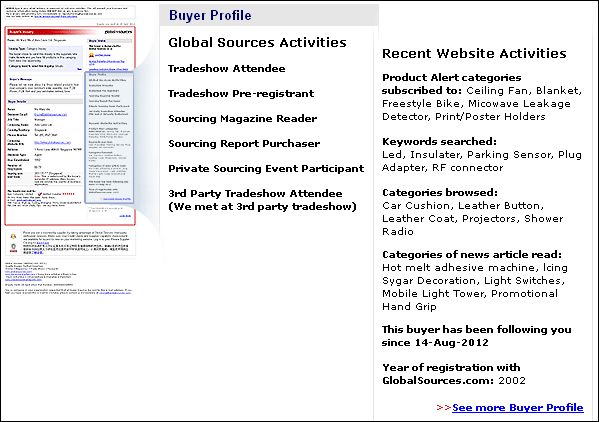
 How do I view inquiries sent to me from buyers? E-mail inquiries which buyers send to you using Global Sources Online services can be viewed and managed in your Private Supplier Catalog. To view them, click on View Inquiries under Inquiries in the menu bar. Please note only administrator-level users can gain the access to these stored inquiries. How can I forward inquiry e-mails to another person? To forward an inquiry to another person, select the inquiries (in your table of e-mail inquiries) you wish to forward, and then click on the Forward Inquiries button. On the next page, you will be prompted to enter the e-mail address(es) of your recipient(s). How can I respond to buyer inquiries? To reply to a buyer's e-mail inquiry, in your table of e-mail inquiries, click on the buyer's e-mail address located at the right. This will launch your e-mail client/application (e.g. Outlook) with the recipient address automatically filled in. Use your e-mail application to write and send your reply. Please note that your reply is not stored in Private Supplier Catalog (your e-mail application will save it if you have set it to do so). How many inquiries/e-mails can my Private Supplier Catalog account store? How long will they be stored? There is no limit to the number of e-mails you can receive and store in your Private Supplier Catalog. Each e-mail will be stored for 2 years from the date of receipt. However, please note that any attachments which came with an inquiry e-mail will be stored in your Private Supplier Catalog for only 2 months. Do save a copy for yourself if you need a copy for the longer term. The attachment in my inquiry e-mail has disappeared — can you retrieve it? We're sorry, we cannot do this — Global Sources staff cannot access or read the contents of your inquiry e-mails. What is Buyer Profile? Buyer profile information provides details about the buyer’s recent sourcing actions to help you understand the buyer’s interests and how he or she uses Global Sources. This information is only available to Verified Suppliers. This is what a Buyer profile page looks like:
What information is included in Buyer Profile? With Buyer Profile, you can see: • The latest 5 unique Product Alert categories the buyer has subscribed to on Global Sources Online. • The latest 5 unique product keywords the buyer has searched for on Global Sources Online. • The latest 5 unique categories the buyer has browsed on Global Sources Online. • The latest 5 unique news article categories the buyer has viewed on Global Sources Online. • Year of registration with Global Sources Online. • If the buyer has attended a Sourcing Fair. • If the buyer has downloaded or subscribed to a Global Sources magazine. • If the buyer has purchased a Sourcing Report. • If the buyer has participated in a Private Sourcing Event.
Do all buyer inquiries contain Buyer profile information? Only inquiries you receive after September 28, 2011 will contain the Buyer profile section, and only for buyers that are willing to share this information. If the buyer chooses to share this activity information, “Included” will be displayed in the “With Buyer profile” column of your inquiries folder in the Private Supplier Catalog.
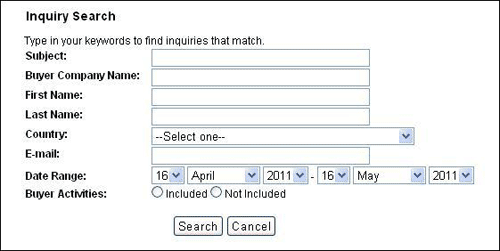
Is there a way to search for inquiries that include Buyer profile? Yes, by using the search function in your inquiry folder. Simply click “Search inquiries” then select “included” next to “Buyer profile.” You can also search for inquiries by subject, company name, first name, last name, country, e-mail address and date range.
How long will Buyer profile information be available in my inquiries folder? For two years – the same as all buyer inquiries.
Why is information from 'Buyer Profile' different from the inquiry the buyer sent? Buyer profile mainly include: • The latest 5 unique Product Alerts categories the buyer has subscribed to on Global Sources Online • The latest 5 unique product keywords the buyer has searched for on Global Sources Online. • The latest 5 unique categories the buyer has browsed on Global Sources Online. • The latest 5 unique news article categories the buyer has viewed on Global Sources Online. Only the 5 latest results from each of these activities is displayed. The buyer's activity history may not have been updated if he cleared his browser cache before sending inquiries. Even if the inquiries you receive do not match the buyers' activities, it does not mean the buyeris not actually interested in your product.
| ||
|