 Print View
 | ||
What is Global Sources Direct Order and why should I be part of it? | ||
| Global Sources Direct Order is an O2O feature that allows buyers to source from Verified Suppliers, place an order and pay for it – all through the Global Sources.
This service allows you to sell directly to buyers who source for your products. You reach buyers who are ready to buy your products in small lots to test market, before committing to larger order. Global Sources Direct Order also gives you a layer of protection by securing the full payment, before you prepare and ship out the order. | ||
Back to Top | ||
| ||
| Is this service open to all Global Sources Suppliers? | ||
| Currently, the Global Sources Direct Order service is open to P1-P6 suppliers. | ||
Back to Top | ||
| ||
What type of products qualify for Global Sources Direct Order?
| ||
Back to Top | ||
| ||
| How do buyers pay for their order? | ||
| Global Sources has partnered with PayPal to handle the payments for Global Sources Direct Order. Buyers can pay for their order using their PayPal account, credit card or debit card. | ||
Back to Top | ||
| ||
| Who receives the payment? Does Global Sources handle the money? | ||
|
Once the buyer pays for their order, the amount – less the applicable transaction fees – will immediately be credited to your PayPal account, and will be released upon shipping the order.
For other regions, please check directly with PayPal. | ||
Back to Top | ||
| ||
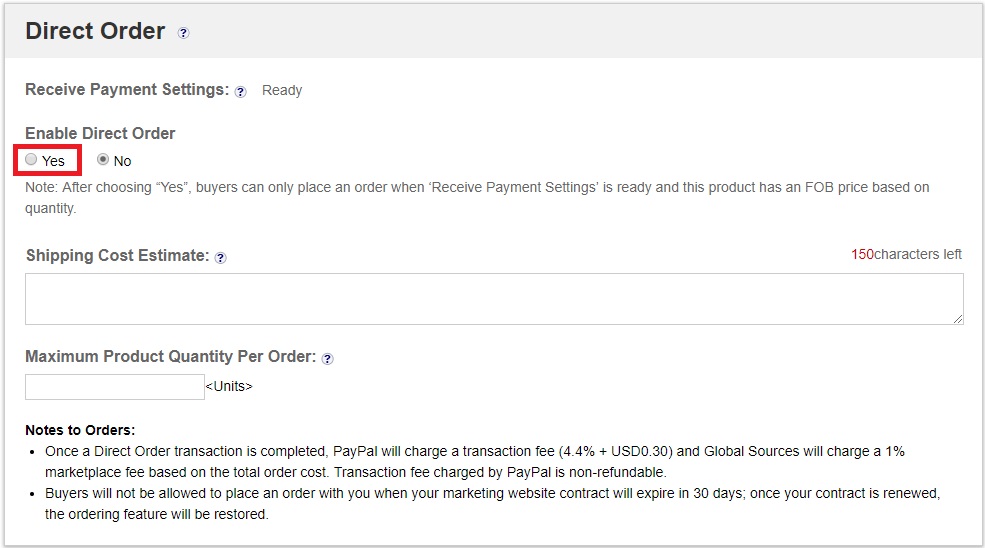
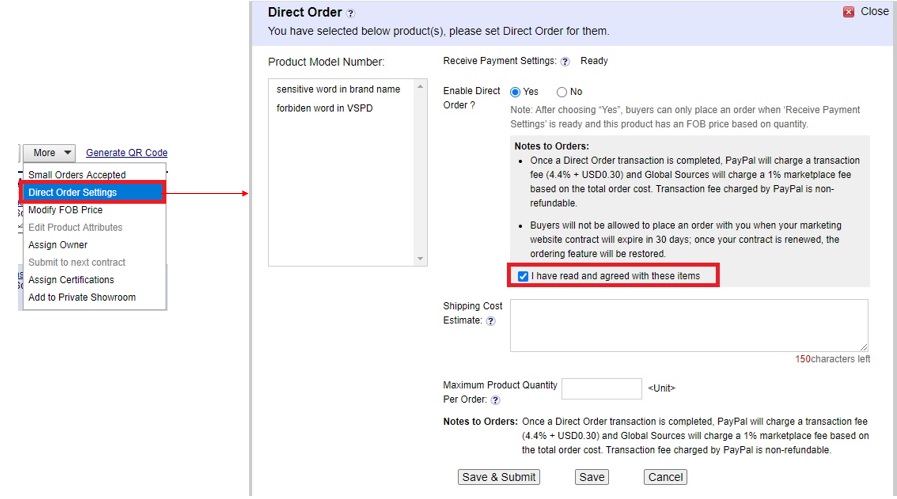
| How do you enable the Direct Order service? | ||
| ||
Back to Top | ||
| ||
| What kind of account type should I have for the Direct Order service? | ||
| A Business PayPal Account is required for the Direct Order service. | ||
Back to Top | ||
| ||
| What is a Business PayPal Account? | ||
Business accounts may be subject to fees that differ from the fees applicable to personal accounts. By opening up a business account or converting a personal account to a business account, you certify to PayPal that you are using it primarily for a business or commercial purpose. You also consent to PayPal obtaining your personal and/or business credit report from a credit reporting agency at account opening, when you request certain new products and whenever PayPal reasonably believe there may be an increased level of risk associated with your business account. | ||
Back to Top | ||
| ||
| How to register for a Business Account? | ||
| Before registration, please prepare your business document/certificate/registration number, the contact information, the email address for the Business Account and the associated bank account.
For more details, please follow the instruction advised by PayPal here: https://www.paypal.com/hk/brc/article/sign-up-business-account
| ||
Back to Top | ||
| ||
| I have registered a Personal PayPal Account, could I upgrade it to Business Account? | ||
| Yes, you can upgrade your Personal PayPal Account to a Business Account.
If you choose to upgrade your Personal PayPal Account to a Business Account, you will need to log in to your Personal PayPal Account, click on Settings in the top right corner and find the upgrade button under ‘Account Information’. | ||
Back to Top | ||
| ||
| How can I be verified with the PayPal account? | ||
To become verified, you need to add and confirm your credit card or debit card.
Note: To confirm your credit card, PayPal will charge your credit card 1.95 USD to send you a 4-digit PayPal code. You’ll need to check your credit card statement for the code and enter it on your PayPal account. PayPal will refund the amount back to your credit card. This may take up to 30 days to appear on the card statement. To confirm your bank account, PayPal will send 2 small deposits to your bank account. The deposits should appear in your bank account within few business days. Please review your bank statement or contact your bank to find out the exact amounts of these deposits. With this information, you can complete the confirmation process online.
If you have any problems when confirming your bank account, please contact PayPal by clicking Help on any PayPal page. | ||
Back to Top | ||
| ||
| Why is there a reminder for KYC (Know Your Customer) verification in my PayPal account? | ||
The KYC procedure is a standard verification process to ensure compliance with local regulations. To start receiving payments, suppliers must complete the KYC process by providing the relevant documents required by PayPal.
| ||
Back to Top | ||
| ||
| How do I get help for PayPal account related issues such as account management, forgotten password, etc. ? | ||
|
Changing the password and security question needs to be done on PayPal.com. Please refer to these steps for reference.
For other regions, please check directly with PayPal. | ||
Back to Top | ||
| ||
| Do I qualify for a special Global Sources merchant rate from PayPal? | ||
As a Global Sources supplier, you enjoy a special merchant fee from PayPal, subject to conditions.
| ||
Back to Top | ||
| ||
| If I’ve already enjoyed a discounted rate with PayPal, will I be charged the standard merchant rate? | ||
| No, PayPal will only charge the discounted rate you already enjoy. If you get the special rate as a Global Sources supplier, then this special rate will be applied to all transactions made with your PayPal account. | ||
Back to Top | ||
| ||
| How do buyers place an order for my product? | ||
Products available for Direct Order will be displayed in the Global Sources website or App with this icon 
We have partnered with PayPal to handle the payments for Global Sources Direct Order. Buyers can pay for their order using their PayPal account, Credit / Debit card. To begin the order process, buyers will click on the ‘Start Order’ button, and submit their order quantity and shipping details. Suppliers will be notified once they receive an order and will be asked to complete the quote by providing the shipping cost. You can use the chat function to contact and reconfirm details with the buyer before you provide a quote. REMEMBER: Please provide a quote (that includes the product cost and shipping cost) within 7 days or the order will automatically be cancelled. Once the buyer receives the quote, they will have 72 hours to make the payment, otherwise the order will automatically be cancelled. | ||
Back to Top | ||
| ||
| What is PayPal’s Seller Protection Program? | ||
Please note that transactions marked “Not eligible” will not qualify for the Seller Protection Program. We encourage you to ask the buyer to register for a PayPal account prior to payment so that the order will qualify to the Seller Protection Program. In addition, the buyer will also enjoy the benefits of PayPal’s Buyer Protection Program.
NOTE: Each region has a different scope of protection. For other regions, please check directly with PayPal. | ||
Back to Top | ||
| ||
| What protection do I have if the transaction is not eligible for Seller Protection? | ||
|
Your PayPal transaction will not be protected by PayPal if the buyer did not register for a PayPal account and settled the transaction using their credit/bank card (i.e. guest check out)
To protect yourself from such case, please encourage the buyers to register a PayPal account before placing the order with their credit/bank card. If the buyer insists on paying with their credit/bank card, please be cautious about the buyers’ region and check if they are in high-risk location. Please pay attention to High value transactions, High velocity payments, Mismatching details of profile and IP, Same IP for multiple users, Gibberish email pattern or phone number. We recommend you to Identify, monitor and leverage significant discrepancies/inconsistencies in buyer information; Blacklist and record users’ behavior; Limits & Caps, especially on new buyers; Be cautious with new territories or spikes from specific areas. | ||
Back to Top | ||
| ||
| Who will handle the shipping? | ||
|
Currently, shipping will be handled by the supplier. This allows you to work with your preferred logistics partner and offer buyers with the best possible price and service.
Please note that before you send your quote to the buyer, it needs to have both the product cost and shipping cost. | ||
Back to Top | ||
| ||
| What is the maximum order supported by Global Sources Direct Order? | ||
| Currently, orders made via Global Sources Direct Order is limited to a total of US$10,000 (with maximum product cost: US$8,000 and maximum shipping cost: US$2,000). If the buyer requires to place an order exceeding that amount, they will be asked to contact you directly. | ||
Back to Top | ||
| ||
| How will I know if I receive an order? | ||
| Once a buyer places an order, you will be notified by email from Global Sources and PayPal, and also receive a notification on the Global Sources Supplier App. | ||
Back to Top | ||
| ||
| Should I ship the product when I received the order or provided the shipping quotes? | ||
|
No, you should not ship the product immediately after receiving and order. Instead, you need to reply to the buyer by providing a total purchase cost that includes the product cost AND shipping cost.
After this, the buyer will have 72 hours to pay for the order, or the order will be automatically cancelled. Once your buyer has made the payment, you have 14 days to ship the product and provide the shipping detail (e.g. tracking code) to the order page in Global Sources. Otherwise, your order will be automatically cancelled and the payment will be refund to your buyer. Please note that all days are calendar days. | ||
Back to Top | ||
| ||
| I’ve received the payment from buyer, why can’t I use or withdraw the amount? | ||
For any other cases, please contact PayPal directly. | ||
Back to Top | ||
| ||
| How can I know if the order has been completed? | ||
|
After you ship the product, the order status will be marked as “Shipped”.
Buyers have 28 days to request for a refund after the product ships, or the order will be marked as “Completed”. If there’s no complaints or refund request made within 28 days after the product ships, the order could be recognized as a Completed Order in most situation. However, the buyer may still be able to request for refund or raise a Dispute/Claim in PayPal within 180 days after the buyer made the purchase. Please assist your buyer if there’s any request from PayPal Platform or Buyer’s issuer bank. Please note that all days are calendar days. | ||
Back to Top | ||
| ||
| What are the transaction fees involved in each order? | ||
|
For every order you process, the following transaction fees will be charged: 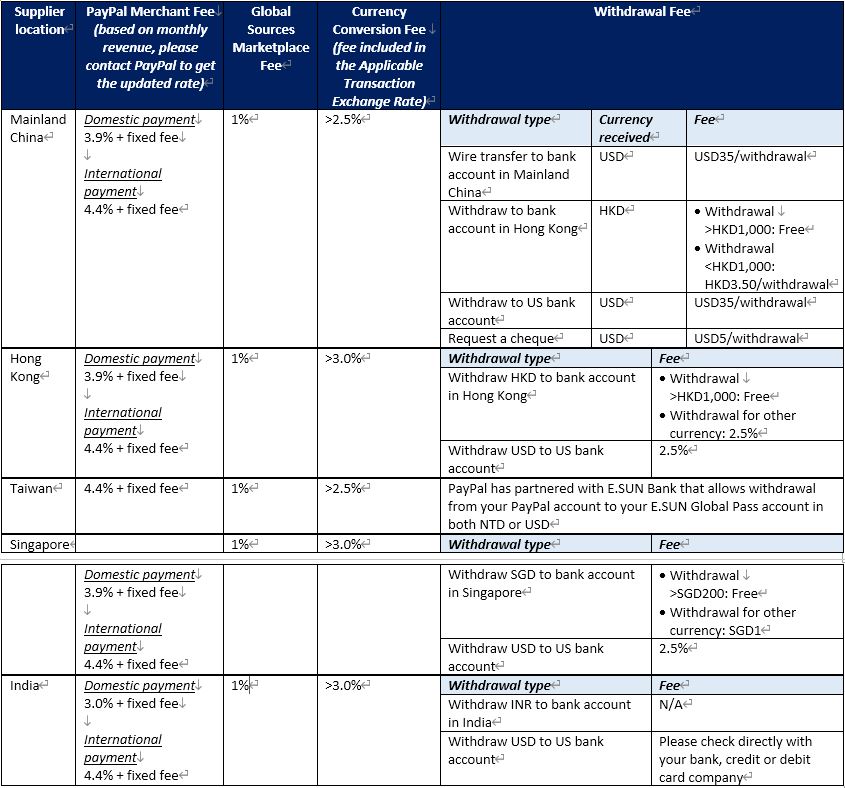
| ||
Back to Top | ||
| ||
| What kind of situation could a buyer request for a refund? | ||
|
A buyer can request for a refund if they haven't received their item, the item buyer received doesn't match the original product description, buyer didn't authorize a transaction, or there's been a billing error. Global Sources and PayPal will assist you and buyer to resolve the issue.
Whenever possible, you should always try contacting the buyer to try and resolve the case. You will be responsible for deciding whether to refund or not. | ||
Back to Top | ||
| ||
| How much should I pay for the refund? | ||
|
Global Sources or PayPal will not charge any refund fee.
If you accepted the refund request from buyer or initiate a refund on PayPal, the fees you originally paid (except for the Global Sources Marketplace Fee) as a seller will not be refunded back to you. The buyer will receive the full payment amount, or a portion of the payment amount in the event of a partial refund. PayPal will retain their transaction fee but return back the Global Sources Marketplace Fee to you, while the refund amount will be deducted during the refunding process. | ||
Back to Top | ||
| ||
| What should I do if I receive a request for a Refund? | ||
|
Buyers could request for a Refund through Global Sources or contact you directly for a refund. You will be responsible for deciding whether to refund or not.
Once a buyer requests for a Refund through Global Sources, you will receive an email and notification on the Global Sources Supplier App.
Alternatively, if the buyer contacted you directly and you agree to a refund, please log in your PayPal account and go to the Transaction Detail Page and click “Request Refund”. Make sure you have all pertinent documents on hand such as proof of shipment or delivery in case it is requested. | ||
Back to Top | ||
| ||
| Could the buyer request for refund when the order has been marked as “Completed”? | ||
|
The order will be marked as “Completed” once the product has been shipped and there’s no refund request within 28 days after it ships.
If the order has been marked “Completed”, the buyer can still request a refund up to 180 days after paying for the order. If the buyer contacted you and you’ve agreed to refund, you can provide the refund by logging in your PayPal account and going to the Transaction Details page and click “Issue a refund”. You will be responsible for deciding whether to refund or not. Please note that all days are calendar days. | ||
Back to Top | ||
| ||
| Could the buyer request for refund even after 180 days of payment? | ||
|
The case will be closed both in Global Sources or PayPal Transaction after 180 days of payment.
In case you agree to refund after 180 days, you could refund by sending the money directly to buyer’s PayPal account. You will be responsible for deciding whether to refund or not. | ||
Back to Top | ||
| ||
| Does Global Sources Direct Order support partial refunds? | ||
|
It support partial refunds.
You can issue partial refunds by managing it through your PayPal account. If you agree to issue the refund through your PayPal account, you should go to the Transaction Details page in you PayPal account and click “Issue a refund”. | ||
Back to Top | ||
| ||
| When should your buyer expect the refund? | ||
How and when the money is refunded depends on how your buyer made the original payment. Refunds will be sent back to the payment method and currency used by you on the original payment.
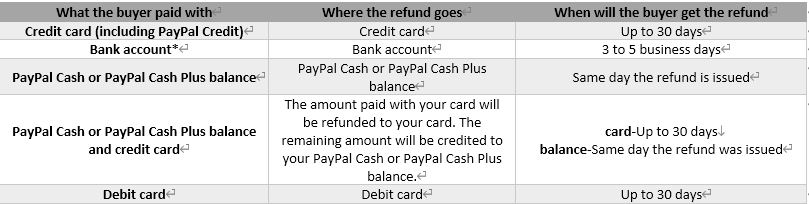
*If your buyer paid with the bank account, the refund will initially go back to the balance before being auto swept back to the original funding source (bank). | ||
Back to Top | ||
| ||
| What would happen if my balance is not enough for refund? | ||
|
If your PayPal account with no sufficient balance, you can’t issue refund by yourself.
But PayPal will deduct the refund amount from your PayPal account when PayPal closed Claim or bank chargeback case in buyer favor and your balance will be shown with negative number. | ||
Back to Top | ||
| ||
| Will I be able to make a refund if my account is frozen/cancelled/limited? | ||
|
You won’t be able to issue a refund to when your PayPal account is frozen / cancelled / limited, but you will be able to issue a refund after reactivating your account. Please contact PayPal to inquire about your account’s reactivation.
During the period to resume your account, the buyer may raise dispute and escalate it into claim. PayPal will reverse the money to buyer if buyer won the case. Please be reminded to response to the Claim within 10 days or the refund will be automatically released to the buyer. | ||
Back to Top | ||
| ||
| What is a chargeback? | ||
| A chargeback is when a buyer asks their credit or debit card issuer to reverse a transaction after it’s been completed. They are available only to buyers who make a payment with their credit or debit card. Because they are initiated with and decided by the debit/credit card issuer (not PayPal), the process is bound by the card issuer’s regulations and time frame. | ||
Back to Top | ||
| ||
| How does the buyer request a Bank Chargeback? | ||
| Rather than filing a complaint with PayPal, a buyer could contact their credit card or debit card provider. In this case, they may file a chargeback. | ||
Back to Top | ||
| ||
| What kind of situation can a buyer request a chargeback? | ||
| ||
Back to Top | ||
| ||
| What is a Bank Reversal? | ||
| A bank reversal, sometimes called an ACH return, is when PayPal receives a request to return funds for a transaction that was funded by a bank account. This request might come from the buyer or the bank itself. Usually this request is filed because of suspected unauthorized use of a bank account. | ||
Back to Top | ||
| ||
| What kind of situation can a buyer request a bank reversal? | ||
| ||
Back to Top | ||
| ||
| What should I do to handle if the buyer requests for a refund via their issuer bank? | ||
|
Buyers are allowed to raise Chargeback & ACH Return cases from their issuer bank. In this case, the supplier will not be protected by the PayPal Seller Protection Program. PayPal will assist the bank to collect the evidence needed to make a decision. Once there’s a case from an issuer bank, you’ll be notified through email or can check at PayPal’s Resolution Center for case details.
Responses to external cases like Chargeback and ACH Return must be done within 10 days. If the supplier does not respond to the Claim after 10 days of the first notice, the refund will automatically be released to the buyer. Make sure to have all pertinent documents on hand such as proof of shipment or delivery in case it is requested. Please note that as outlined in the PayPal User Agreement, if you refund (partially or fully) a transaction to a buyer, you will not be charged any additional fees. However, the fees you were originally charged (except the Global Sources Marketplace Fee) will not be refunded to you. | ||
Back to Top | ||
| ||
| What is a Dispute? | ||
| If buyers have a problem with a transaction, they can bring it to your attention by opening a dispute in PayPal’s Resolution Center. The dispute process is an opportunity to resolve issues before they become escalated to a claim. It’s in your best interest to work with the customer to resolve the dispute. This is your chance to use great customer service to solve an issue and help prevent it from growing into something larger. | ||
Back to Top | ||
| ||
| How will I know if a Dispute is filed against me? | ||
| If a dispute is filed against you, you’ll receive an email about it and a case will be created in the PayPal’s Resolution Center. The Resolution Center is a secure communication channel in the My Account section in your PayPal Account where you and your buyers can work together to resolve disputes. | ||
Back to Top | ||
| ||
| How should I handle a Dispute? | ||
Buyers can raise a Dispute on PayPal, seven (7) days after the original transaction date. You will be notified via email or can check the Resolution Center and click View under Action next to your case for the details. The system will remind you to respond to this case within 20 days. During this time, the payment will be held while you decide to accept or cancel the refund.
Make sure to have all pertinent documents on hand such as proof of shipment or delivery in case it is requested. Please note that as outlined in the PayPal User Agreement, if you refund (partially or fully) a transaction to a buyer, you will not be charged any additional fees. However, the fees you were originally charged (except the Global Sources Marketplace Fee) will not be refunded to you. | ||
Back to Top | ||
| ||
| What if I can’t come to an agreement with the buyer? | ||
|
Once a Dispute is opened, you have 20 days to work with the buyer to resolve it. (PayPal won’t be involved at this point.) If neither you nor the buyer escalates the dispute during the 20-day window, it will be closed automatically. If you can’t work out a resolution, either party can elevate the Dispute to a Claim.
REMEMBER: Your funds may be temporarily unavailable when a dispute is filed. This will stay in place while you work with the buyer to resolve the dispute. | ||
Back to Top | ||
| ||
| How can I help prevent a Dispute? | ||
| ||
Back to Top | ||
| ||
| What is a Claim? | ||
| If a buyer dispute can’t be resolved, either party can escalate it to a claim during the 20-day period. At this point, PayPal becomes directly involved and will make a decision using the information that’s provided. A buyer can also file a claim (without first initiating a dispute) if they feel their account has been used fraudulently. During the resolution process, PayPal may ask either or both parties for more information via email. | ||
Back to Top | ||
| ||
| How will I know if a Claim has been filed against me? | ||
|
If a Claim has been logged, you’ll be notified via email. You’ll also see that a case is created in PayPal’s Resolution Center.
Please treat the Claim case seriously -- PayPal will determine the result based on your evidence and responses. | ||
Back to Top | ||
| ||
| How should I handle a Claim? | ||
|
Buyers or you can escalate a Dispute to Claim in PayPal within the 20 days of the Dispute case. Once there’s a Claim, PayPal will review the case and determine the outcome usually within 30 days, though sometimes it can take longer, depending on the complexity of the case.
PayPal will email you updates and requests for any additional information. You can always check the status of the case by visiting the Resolution Center and click Respond in the Action column next to your claim. The system will remind you to respond to this case within 10 days. During this time, the payment will be held and PayPal will determine whether to refund or not after collecting materials from you and the buyers. If the you didn’t response to the Claim after 10 days of the first notice, the refund will automatically be released to the buyer. Make sure to have all pertinent documents on hand such as proof of shipment or delivery in case it is requested. Please note that as outlined in the PayPal User Agreement, if you refund (partially or fully) a transaction to a buyer, you will not be charged any additional fees. However, the fees you were originally charged (except the Global Sources Marketplace Fee) will not be refunded to you. | ||
Back to Top | ||
|
 | | | ||
|
||||
| | | ||

Copyright © 2016 Media Data Systems Pte Ltd (Singapore Co. Reg. No. 199001601W). All rights reserved. Any unauthorized reproduction of any content herein is strictly prohibited.
Terms of Use Privacy Policy Security Measures
Terms of Use Privacy Policy Security Measures