Protect yourself from "Phishing"
Note: if you suspect phishing activity, immediately change your e-mail account password and forward any suspicious e-mails to reportphishing@globalsources.com.
Phishing is a global problem. Incidence of phishing are on the rise, and everyone who uses the Internet is affected. The open environment of online sourcing benefits exporters by generating many more sales leads from global importers than was possible before the Internet. However, the Internet's openness makes it easier for scammers to find and defraud victims too. Therefore, it is critical that you and your staff take preventative actions.
How phishing works
Step 1: Scammer obtains your e-mail username and password
First, the scammer (a fake buyer) sends you an e-mail asking you to click on a website link to view his sample products. The link takes you to their phishing website where you are requested to enter your e-mail username and password to see the products. If you do so, the scammer then uses this information to directly access your e-mail account and see the e-mail addresses of your friends or business contacts.
Step 2: Scammer uses this information to trick you or your clients into sending him money
There are several ways this is typically done:
1. The scammer pretends to be you and persuades your buyer (or friend) to send money to his bank account.
OR
2. Using an email address that looks similar to one of your friends or business contacts, the scammer persuades you to send money to his bank account.
OR
3. The scammer sends phishing messages to your contacts. If the scammer can trick your buyers into providing their e-mail usernames and passwords, he then pretends to be your buyer and persuades you to send money to his bank account.
! How to protect yourself
- NEVER enter your e-mail username or password in an unknown website; real buyers will never ask you to input this information to view their products
-
If you or any of your staff members have already entered your username and password on an unknown website, take the following action:
- Immediately change your password for Global Sources Online at www.globalsources.com
- Immediately change your e-mail password
- Immediately report any questionable e-mails and contact information to reportphishing@globalsources.com. We will then block the e-mail address.
- If you receive an unusual request for money, even from a friend or business associate, always verify by phone first that the request is real before sending money.
How to identify phishing sites
-
Using Global Sources Online as an example, if you are directed to a Global Sources login page, always confirm that the address appearing in your web browser is https://login.globalsources.com/ and, if you are using Internet Explorer, that there is a padlock in the address bar indicating third-party authentication of the domain name. (See below)
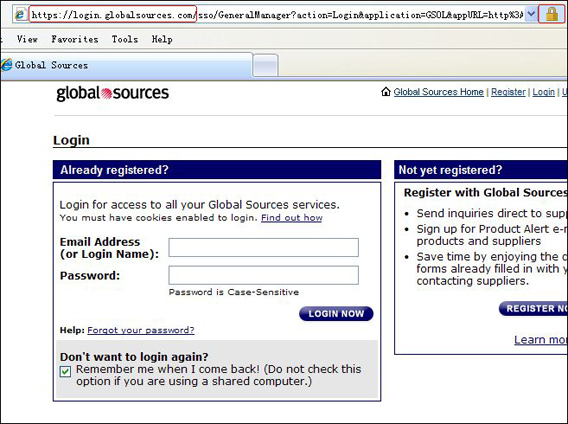
Note: URLs for all Global Sources websites will not have a "/" between "http://" and "globalsources.com" (for example: http://xxx.globalsources.com/xxx.co). If there is a "/" in that location (for example: http://xxx.com/globalsources.htm), then this is likely a phishing website. This holds true for all websites as well.
How to identify phishing e-mails
-
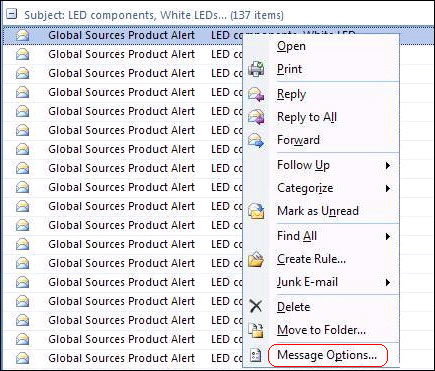
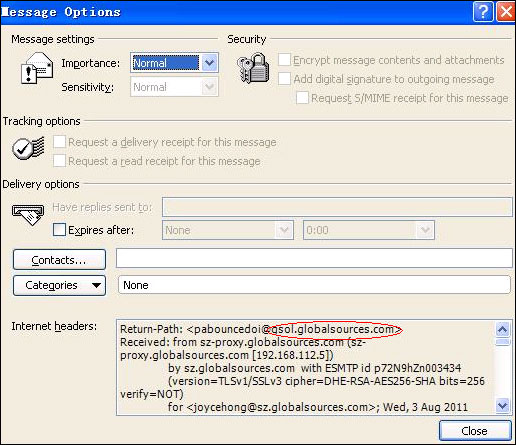
If you receive an e-mail from Global Sources, confirm that the sender's internet header uses an @globalsources.com address.
In Outlook, you can confirm this by 1) right-clicking the e-mail, 2) selecting "Options", 3) checking the information in the Internet Header section (see below)
- Check the message body to confirm that the layout and style is similar to that of previous Global Sources e-mails.
-
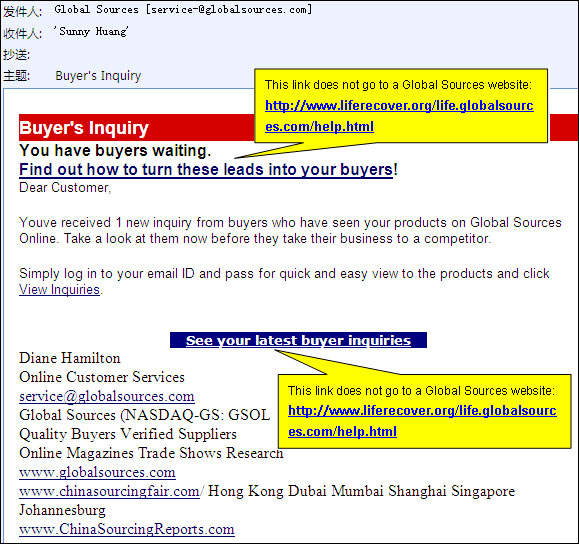
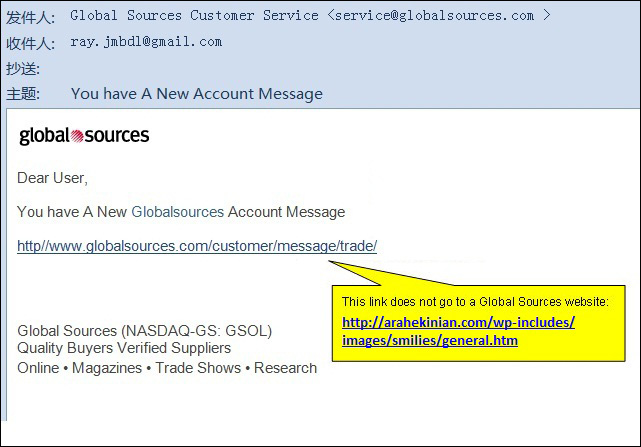
Check the links in the message body to confirm the destination URL. Simply mouse over the link and the destination URL will appear in a popup window. Real Global Sources links will have a format similar to this: http://xxx.globalsources.com/xxx.co. If the link does not follow this format, it could be a link to a phishing site. (See below)
- We provide the IP country in every RFI. If the country entered by the buyer is different from the IP country, you should exercise greater caution, especially for Nigeria. (Note: Because many genuine buyers also operate outside their country of business registration, you should not totally dismiss these RFIs.)
- To learn more about protecting yourself from phishing, visit Global Sources' eLearning site.
Back to Top
|
 Print View