Download App
Better Online and Trade Show Sourcing Experiences.Scan the QR code to download.
Learn More
Hot Topics
The new accessory adds a “back” button to many apps without requiring any software installation.
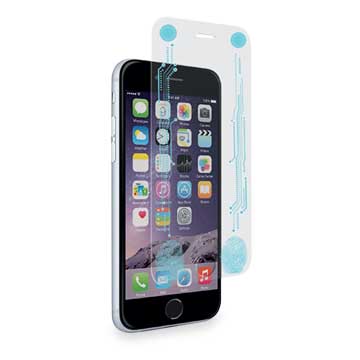
The Smart + Buttons screen protector adds a hardware “back” and
“menu” button to many apps (Image source: PureGear)
Apple’s designs adopt as few interfaces as possible to accomplish the task at hand. The company’s new Macbook Air, for example, uses a single port for power, data, control and display interfacing. The iPhone line typically has just a little more: the home, power, and lock and volume control buttons. For many users, especially former Android customers used to hardware buttons, this can be an unwelcome change.
That’s one reason why cases with additional buttons have been of interest to new iPhone users. A new screen protector called Smart + Buttons takes this a step further, however. From accessory maker PureGear, the protector looks like any other tempered glass screen protector, but includes a pair of invisible buttons positioned at the bottom of the phone.
The $40 screen protector has circuitry leading to the top left and right corner of the iPhone’s screen, where the menu and return commands are most often found in apps. When the screen is tapped at the bottom of the screen protector, it sends a signal similar to what a human touch on a screen’s top left or right corner does. Therefore, the screen protector acts as a back or menu button in a wide variety of apps.
In addition, it does not require additional installation or software because the only interface is with the physical screen itself. This aspect is important among those who want to sell a similar screen. The lack of software requirements means that this sort of function can be replicated by firms without software experience.
More Sourcing News
Read Also

关注 “环球资源外贸” 官方微信,获取实时外贸资讯
iOS & Android
iOS & Android(Mainland China)
Copyright © 2026 Publishers Representatives Limited. All rights reserved.