Download App
Better Online and Trade Show Sourcing Experiences.Scan the QR code to download.
Learn More
Hot Topics
The Yoga Book does away with a traditional keyboard and replaces it with a Wacom surface and software keyboard.
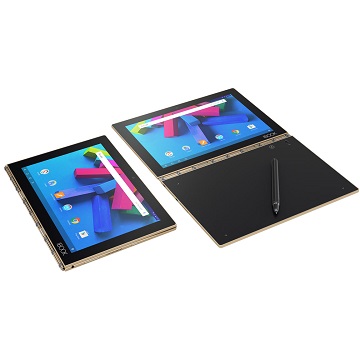
The base of Lenovo's Yoga Book serves as both a Wacom drawing surface and a software keyboard (Source: Lenovo)
It is hard to innovate in the laptop space. For the most part, it seems like anything that has been thought of before has already been put into practice. It is ironic, then, that one of the more innovative devices in this product segment is coming from China, a country that is currently in the process of trying to shake its "copycat" image. Lenovo unveiled recently the Yoga Book, which, in spite of the name, is not a Surface Book clone.
The form factor of the Yoga Book should be familiar to anyone who has seen one of Lenovo's Yoga laptops before. It has the same hinge that allows the keyboard to flip 360 degrees, transforming the laptop into a tablet. The main difference is that the Yoga Book does not really have a keyboard. Instead, it has a touch panel with Wacom's technology built in, giving it 2,048 levels of touch sensitivity. The panel has a standard keyboard layout so people can type on it. Those who remember Microsoft's Touch Cover for the original Surface will know this is not an especially appealing typing experience, but Lenovo told the Verge that people 25 years old and younger "can adapt fully to the keyboard and be typing at speeds consistent with what they type on a traditional keyboard within 40 to 60 minutes." For some reason, people older than 35 take a couple hours to adjust, according to Lenovo.
The typing experience might be a trade-off for the other advantages of having a Wacom surface readily available at all times. Lenovo includes a digitizer pen with an ink insert with the Yoga Book. The real ink is an important component of Lenovo's pen because it allows people to put a stack of paper on the Wacom panel and have all their notes digitized automatically as they write. This can only be done with a stack of 1 inch or smaller, but that should be enough paper for most note-taking sessions. The Yoga Book also comes with its own paper that can attach magnetically to the surface, but any paper works just as well.
Lenovo is not really trying to compete with any devices already on the market with this product. It appears to be something entirely new that users will either find valuable or not, similar to the iPad when that first debuted. So the specifications of the Yoga Book are not meant to go head to head with the likes of the Surface devices or MacBooks. Instead, the Yoga Book runs on an Intel Atom x5-8550 processor, 4GB of RAM and has 64GB of internal storage. The 10.1in screen is full HD instead of one of the super high-resolution screens that have been popular lately, but few people are likely to notice the difference. The Yoga Book was also supposed to have a second full display, but Lenovo settled for the more simplified touch panel to improve battery life and shave off some weight.
Adding to the identity crisis of the Yoga Book, two different operating systems will be available: Android and Windows. The Android version starts at $500, and Lenovo's custom design seems to take some hints from Jide's Remix OS, as both allow for apps to be run simultaneously in different windows. The Windows 10 version has all the support that Windows ships with for touch displays in programs such as OneNote. The product was designed originally to be solely run on Android, but Lenovo later decided to ship a Windows version when it noticed some markets prefer the Microsoft OS.
The Android-only option would have made some want to define this as a new kind of tablet, and maybe it is, but the form factor is more similar to a laptop. Detachable laptops and other two-in-ones have been stars of the PC world since growth in this product category has improved while the rest of the market declined. Lenovo's Yoga Book is the first sign of a company making an earnest effort to do something more with this popular form factor. Whether it is called a laptop, tablet or something else seems to be beside the point. The more interesting question is whether enough people be taken with this idea for other companies to make similar products.
More Sourcing News
Read Also

关注 “环球资源外贸” 官方微信,获取实时外贸资讯
iOS & Android
iOS & Android(Mainland China)
Copyright © 2026 Publishers Representatives Limited. All rights reserved.




