




AI glasses for the blind are transforming assistive technology by translating visual information into spoken words. These wearable devices use artificial intelligence, computer vision, and built-in cameras to help users read text, recognize faces, identify objects, and navigate surroundings independently. This guide reviews the best options available in 2026 and helps you choose the right pair for your needs.
What Are Smart Glasses for the Blind? (And What Are They Called?)
Smart glasses for the blind, often referred to as assistive eyewear or AI-powered visual aids, are advanced wearable devices designed to interpret the visual world and convey that information audibly to the user.
Unlike traditional eyewear that corrects vision, these high-tech glasses utilize artificial intelligence and computer vision to provide real-time audio descriptions of surroundings, enabling users to "see" through sound. Common terms for this technology include AI glasses, smart glasses for the visually impaired, and dedicated product names like the OrCam MyEye.
These innovative devices function as a digital companion, featuring built-in cameras that capture the user's field of view and sophisticated software that instantly recognizes objects, text, faces, and even money bills.
By converting visual data into spoken words, smart glasses empower blind individuals to perform daily tasks independently—such as reading a restaurant menu, identifying products on a shelf, or recognizing a friend's face—effectively transforming challenges into opportunities for greater freedom and self-reliance.
How AI Glasses Are Transforming Navigation and Recognition
AI glasses are redefining independence for individuals who are blind or visually impaired by serving as an intelligent, wearable companion that interprets the visual world and delivers critical information audibly.
By integrating advanced sensors, computer vision, and artificial intelligence, these smart glasses transform how users navigate unfamiliar environments and recognize the people and objects around them.
1. Transforming Navigation with AI-Powered Guidance
Modern AI glasses are revolutionizing how visually impaired individuals navigate both urban and indoor environments by moving beyond traditional GPS limitations. Unlike a smartphone that requires constant attention, these glasses provide seamless, turn-by-turn guidance directly to the user's ear through discreet audio cues, with some advanced models even projecting visual arrows and mini maps directly onto the lens.
This hands-free approach allows users to stay fully aware of their surroundings—hearing the sounds of traffic or a conversation—while receiving gentle prompts like "In 100 meters, turn right," making independent travel safer and more intuitive than ever before.
Key technologies enabling AI navigation:
- Multi-sensor fusion: Combines GPS, accelerometers, and gyroscopes to track position and head orientation accurately, even in areas with weak satellite signals.
- On-device spatial computing: Processes movement and location data locally to deliver real-time route updates without relying on cloud connectivity.
- Bone conduction or open-ear audio: Delivers navigation prompts through speakers that sit outside the ear canal, keeping users aware of ambient environmental sounds.
- Optional waveguide displays: Projects turn indicators and mini maps directly onto the lens for users who benefit from visual reinforcement.
2. Transforming Recognition with Real-Time Visual Interpretation
Beyond navigation, AI glasses are fundamentally changing how users interact with the world through powerful real-time recognition capabilities. The built-in camera acts as a second pair of eyes, constantly scanning the environment so the onboard AI can identify text, objects, faces, and products.
This constant audio feedback transforms an otherwise abstract visual world into a comprehensible and navigable space, empowering users to shop, socialize, and manage daily tasks with a level of independence previously unattainable.
Key technologies enabling AI recognition:
- Computer vision models: Runs optimized neural networks on-device to recognize text, objects, faces, and scenes with low latency.
- Optical character recognition (OCR): Converts printed and digital text from menus, signs, and labels into machine-readable data that can be spoken aloud.
- Facial recognition algorithms: Learns and identifies known individuals, providing audio cues like "John is approaching" during social interactions.
- Barcode and product scanning: Identifies packaged goods by reading barcodes or matching product appearance against a database, useful for shopping independently.
Best AI Glasses for Blind 2026: A Detailed Review
The market for AI-powered assistive eyewear has evolved significantly, offering two distinct paths for blind and visually impaired users. On one hand, dedicated assistive devices like the Envision Glasses are purpose-built from the ground up for accessibility, offering robust, specialized features.
On the other, mainstream consumer products like the Meta Ray-Ban Smart Glasses have accidentally become powerful assistive tools, leveraging advanced AI at a fraction of the cost. Choosing between them depends on whether your priority is specialized medical-grade functionality or versatile, stylish, and affordable AI assistance
Envision Glasses: The Pioneers of Visual Assistance
Envision Glasses are a dedicated assistive technology solution designed specifically for individuals who are blind or have low vision. Unlike general-purpose smart glasses, Envision's software is built entirely around accessibility, turning visual information into spoken words to promote independence. The latest model, developed in partnership with Solos, represents a significant leap forward, moving away from discontinued hardware like Google Glass to a modern, powerful platform.
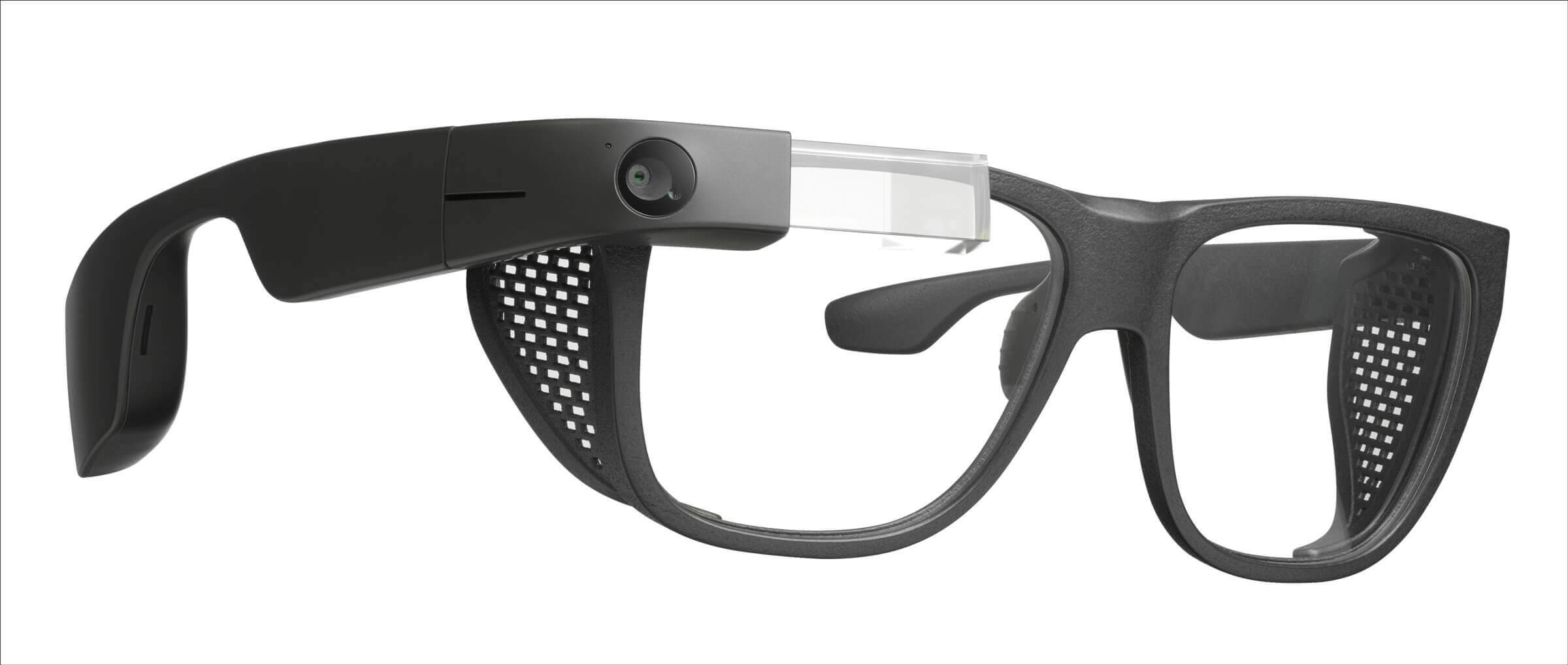
- Key Features:
- Comprehensive Text Reading: Instantly reads text from any surface—books, letters, product labels, restaurant menus, and even handwriting—and can perform OCR (Optical Character Recognition) in multiple languages.
- Scene Description & Object Recognition: Describes the environment, identifies everyday objects, and can recognize people, colors, and money bills.
- Continuous Vision Mode: A unique feature that, once activated, continuously describes the user's surroundings without needing to be prompted for every single query, providing a constant stream of environmental awareness.
- "Ally" AI Assistant: Utilizes a powerful, custom-built AI assistant that integrates multiple foundational models (including Meta's Llama, OpenAI's ChatGPT, Google's Gemini, and Perplexity) to provide accurate and contextual information.
- Advantages:
- Purpose-Built: Every feature is designed with blind and low-vision users in mind, resulting in a more reliable and intuitive experience for assistive tasks.
- Advanced Recognition: Generally offers more robust and accurate text and object recognition specifically trained for assistive use cases.
- Long Battery Life: Provides up to 16 hours of continuous use on a single charge, making it reliable for all-day wear.
- Durable Design: Features an IP67 rating, making it dust-tight and able to withstand immersion in water, ideal for everyday wear and tear.
- Who It's Designed For: Individuals for whom reliable, dedicated assistive functionality is the absolute priority. It is ideal for users who need a device that acts as a primary tool for reading, recognition, and environmental awareness throughout their entire day, without compromise.
- Price: $699 (which includes one year of access to the Ally AI software), with a subsequent subscription fee of $10 per month.
- Where to Buy: Available for pre-order directly from the official Envision website.
Meta Ray-Ban Smart Glasses: A Mainstream Contender with Assistive Potential
The Meta Ray-Ban smart glasses are a stylish, consumer-focused wearable that has found a powerful second life as an assistive device for the blind. While originally designed for social media and hands-free communication, the integration of a powerful multimodal AI (Meta AI) allows it to act as a pair of "eyes" for users, describing scenes, reading text, and answering questions about the world in real-time. The Gen 2 model offers significant improvements in battery life and AI responsiveness.
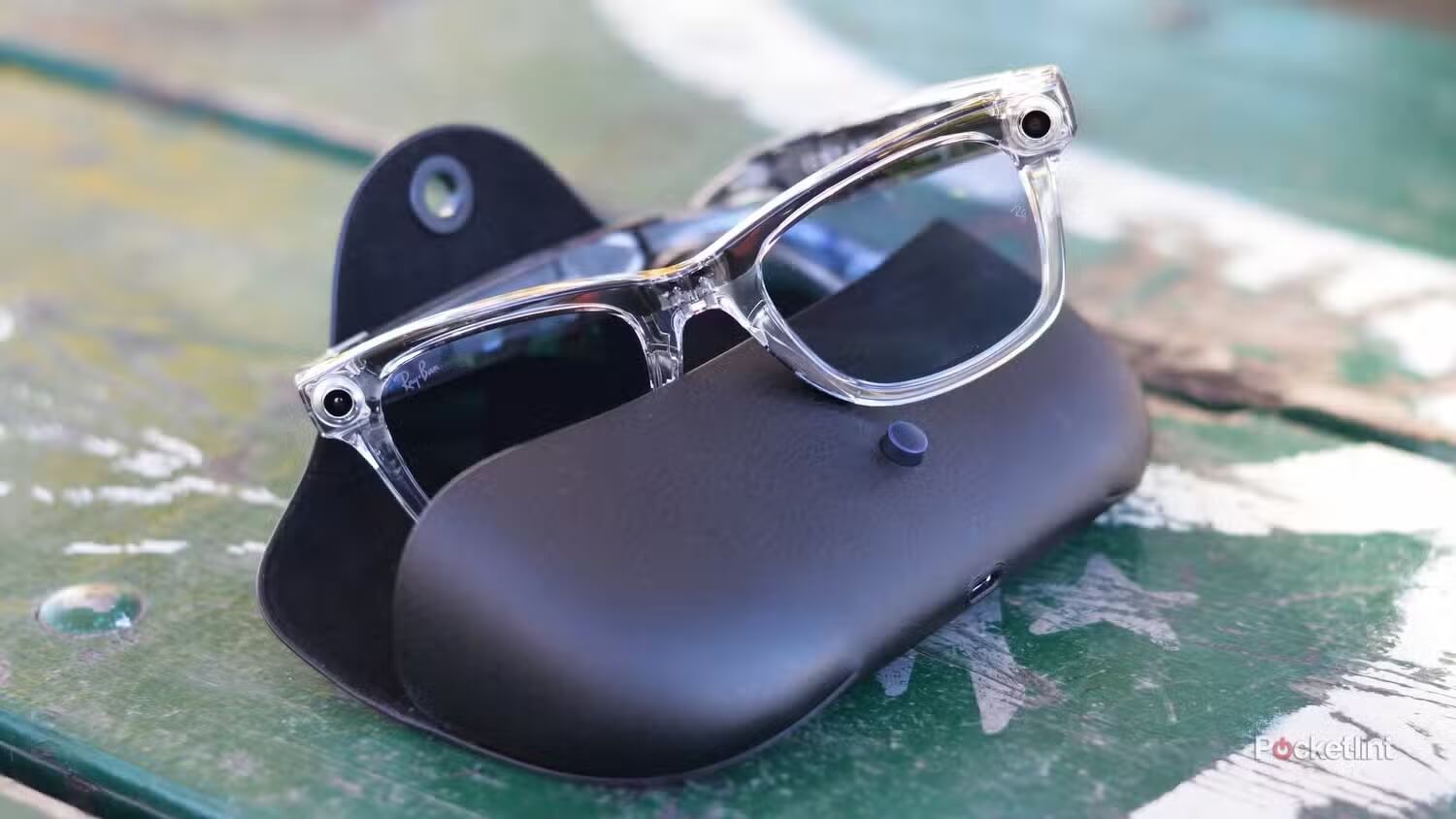
- Key Features:
- Hands-Free Scene Interpretation: Using the "Hey Meta, look and..." voice command, users can ask the glasses to describe what's in front of them, read text from a piece of mail, or identify objects.
- Discreet & Stylish Design: They are virtually indistinguishable from standard Ray-Ban sunglasses or prescription eyewear, offering a level of style and social comfort that dedicated assistive devices often lack.
- Integrated Apps: Seamlessly connects with accessibility apps like Be My Eyes, allowing users to connect with a sighted volunteer for complex tasks like navigation or detailed identification.
- Multilingual AI Support: Meta AI supports voice interactions and translation in multiple languages, including Hindi, Kannada, and Telugu, broadening its global accessibility.
- Advantages:
- Affordability: Priced at a fraction of dedicated assistive glasses, starting at $299, making them the most accessible AI glasses on the market
- All-Day Wearability: The stylish design and improved 8-hour battery life (Gen 2) make them comfortable and practical for wearing all day, every day.
- Dual Functionality: They serve as excellent everyday smart glasses (for music, calls, photos) and a capable assistive tool, providing immense value.
- Who It's Designed For: Ideal for users who want a versatile, stylish, and affordable entry point into AI-powered assistance. It is perfect for those who need help with daily tasks like reading mail, getting scene descriptions, and identifying objects but also value a product that blends in and doesn't look like "medical equipment."
- Price: Starting at $299 for the previous model and $379 for the Gen 2, with display-equipped versions starting at $799.
- Where to Buy: Widely available from major retailers like Amazon, Target, LensCrafters, and the official Meta Store
Envision vs. Meta Ray-Ban: Which One is Right for You?
Choosing between the Envision Glasses and the Meta Ray-Ban smart glasses ultimately comes down to a fundamental question: do you need a specialized medical device or a versatile, everyday tool with powerful AI? Envision is a dedicated assistive device built for reliability and comprehensive functionality, while the Meta Ray-Ban is a mainstream AI gadget that happens to be exceptionally useful for the blind community .
The table below breaks down their key differences to help you decide.
| Feature/Aspect | Envision Glasses | Meta Ray-Ban Smart Glasses |
|---|---|---|
| Primary Purpose | Dedicated assistive technology for the blind and low-vision community. | Mainstream consumer smart glasses (social media, communication) with powerful AI. |
| Core Technology | Custom "Ally" AI assistant integrating multiple models (Llama, ChatGPT, Gemini) for robust recognition. | Meta AI multimodal assistant for scene interpretation and general Q&A. |
| Key Assistive Features | Comprehensive text reading, continuous vision mode, object/face recognition, barcode scanning. | On-demand scene description, text reading ("look and read"), object identification. |
| Connectivity | Leverages Bluetooth to connect to a smartphone app for processing. | Must be paired to a smartphone (iOS/Android) for all AI processing. |
| Design & Style | Functional, tech-forward design focused on utility. | Stylish, iconic Ray-Ban frames that look like normal glasses. |
| Battery Life | Excellent: Up to 16 hours of continuous use. | Good (Gen 2): Up to 8 hours of typical use. |
| Price | $699 (includes 1-year software subscription) + $10/month thereafter. | $299 - $379 (Gen 2) with no subscription fees. |
Which One is Right for You?
- Choose Envision Glasses if: Your primary need is for a reliable, all-day assistive companion. If you require robust features like continuous environmental description, highly accurate text and object recognition, and you are comfortable with a subscription model for specialized software, Envision is the superior choice. It is an investment in a dedicated tool built to maximize your independence.
- Choose Meta Ray-Ban Smart Glasses if: You are looking for an affordable, stylish, and versatile entry point into AI-powered assistance. If you value a product that looks like a normal pair of glasses, can also be used for listening to music or taking calls, and provides incredibly useful on-demand AI help for a fraction of the cost, the Meta Ray-Bans are a game-changer. They are perfect for users who want powerful assistance without the "assistive device" label.
Other Notable Assistive Smart Glasses & Technologies
While Envision and Meta dominate the current conversation, other players are contributing to the ecosystem, offering specialized services and new hardware options.
- Aira: Aira is not a pair of glasses, but a professional service that provides on-demand access to trained, sighted agents. Users can connect to an agent via smart glasses (like the Meta Ray-Bans or other compatible devices) who can see what the user's camera sees and provide real-time verbal guidance for navigation, shopping, or any other task. This human-in-the-loop model offers a higher degree of accuracy and safety for complex situations.
- Agiga EchoVision: A new entrant focused on providing richer, more comprehensive audio descriptions. Developed with input from blind users (including Stevie Wonder), it features a wider 110-degree camera angle to capture more of the scene with less head movement. It is expected to launch in early 2026.
- Oakley Meta Vanguard: A sports-oriented version of Meta's AI glasses, designed for active users. It integrates with fitness apps like Garmin to provide real-time workout feedback, track performance metrics, and even auto-capture video highlights, making it a great option for blind and low-vision athletes.
How to Choose the Right AI Glasses: A Practical Buyer's Guide
1. Define Your Primary Need: Navigation, Reading, or Recognition?
Before comparing technical specs, ask yourself what you need the glasses to do most. Different devices excel in different areas, and identifying your primary use case will narrow your options significantly.
Do you need help navigating unfamiliar environments?
If your biggest challenge is traveling independently—walking through city streets, finding specific stores, or navigating large indoor spaces like hospitals or airports—you need a device with robust navigation features. Look for glasses that offer real-time GPS guidance, audio cues for turns, and the ability to query your location. While many AI glasses can describe a scene, true turn-by-turn navigation is less common.
For instance, Meta Ray-Bans can tell you what street corner you're on and describe nearby landmarks, but they are not yet reliable for providing active walking directions. Dedicated navigation may require integrating with services like Aira, which connects you to a live agent who can guide you remotely.
Do you primarily need help with reading and daily tasks?
For many, the dream is to independently read mail, scan grocery items, or identify canned goods. If this is your priority, focus on devices with strong optical character recognition (OCR) and object recognition. Both Envision and Meta Ray-Ban offer text-reading capabilities, but they do so differently.
Envision is purpose-built for this, offering reliable reading of everything from handwriting to digital screens. The Meta Ray-Ban is highly effective for quick tasks like reading a letter or a menu, though it may sometimes summarize text instead of reading it word-for-word unless prompted specifically to "read every single word".
Do you want a constant awareness of your surroundings?
Some users want a device that acts as a continuous "second pair of eyes," providing ongoing audio descriptions of the environment. For this, you should look for a device with a continuous vision mode.
Envision Glasses offer this feature, constantly describing what's in front of you without needing a prompt for every single query. The Meta Ray-Ban, in contrast, is a query-based system where you must ask "Hey Meta, look and tell me what you see" to get a description.
2. Feature Checklist: What to Look For
Once you've defined your primary need, use this checklist to evaluate the specific features of different models. Not all AI glasses offer the same capabilities.
- Text-to-Speech (OCR): Can the glasses read printed and digital text aloud reliably? How well do they handle different fonts, handwriting, or languages? Do they offer a choice between summarizing and reading word-for-word?
- Real-Time Object Recognition: Can the device identify common objects around the home or in public? Can it distinguish between different cans of food or identify a specific item you've lost, like a set of keys?
- Facial Recognition: Does the glasses' software allow you to learn and remember faces, announcing the name of a friend or family member as they approach?
- Scene Description: How detailed and accurate are the descriptions of your environment? Can the glasses describe the layout of a room, the people in it, and what they are doing?
- Navigation & Location Awareness: Can the glasses provide turn-by-turn directions? Can they identify your current street address or landmark? Do they integrate with GPS and mapping services?
- Currency & Color Identification: Can the glasses reliably identify different denominations of money bills and distinguish between colors? This is a critical feature for independence when shopping and choosing clothing.
- Connectivity & Ecosystem: Do the glasses integrate with other helpful apps like Be My Eyes or AIRA? This can provide a safety net, allowing you to connect with a sighted human for complex tasks the AI cannot handle.
3. Battery Life and Wearability
A device with amazing features is useless if it's dead by midday or too uncomfortable to wear. These practical factors will determine whether the glasses become an essential part of your daily life or an accessory that stays in a drawer.
Battery Life: This is one of the most significant differences between devices. If you need all-day assistance from morning until night, you require a device with extended battery life. The Envision Glasses offer up to 16 hours of continuous use on a single charge, designed to last through a full, active day.
The Meta Ray-Ban (Gen 2) offers a respectable 8 hours of mixed use, which covers a typical workday but may need a recharge if you use intensive AI features constantly . The included charging case for Meta glasses provides multiple top-ups, effectively extending their total daily runtime.
Comfort and Fit: You will be wearing these glasses for hours, so comfort is paramount. Consider the weight of the frames, the adjustability of the nose pads, and the overall balance. Devices like the Meta Ray-Ban are built on classic, well-tested frame designs, making them comfortable for all-day wear. Envision glasses are also designed for extended use, but personal preference for fit will vary.
Style and Discretion: For many users, how the glasses look is just as important as how they function. The Meta Ray-Ban glasses have a massive advantage here, as they are stylish and virtually indistinguishable from normal sunglasses or prescription eyewear.
This can reduce social stigma and make the user feel more comfortable and less conspicuous in public . Dedicated assistive devices often have a more "tech-forward" look, which may be a trade-off for their specialized functionality.
Durability: Consider your lifestyle. Do you need glasses that can withstand bumps, drops, or the elements? Look for durability ratings like IP (Ingress Protection) codes. The Envision Glasses, for example, have an IP67 rating, meaning they are dust-tight and can survive being submerged in water, offering excellent protection for everyday wear.
Experience the Future of AI Glasses at the Hong Kong Shows
The AI glasses featured in this guide represent the cutting edge of assistive technology, but the industry continues to evolve at a rapid pace. For those who want to see the latest innovations firsthand, meet leading manufacturers, and discover emerging products before they hit the market, the AI+ Products Hall at Hong Kong Shows offers the perfect opportunity. This premier exhibition brings together top suppliers from Shenzhen and beyond, showcasing the next generation of AI eyewear, wearables, and accessibility solutions under one roof.
Event Details:
- Event: Hong Kong Shows Phase 2 – AI+ Products Hall
- Dates: October 18–21, 2026
- Location: AsiaWorld-Expo, Hong Kong
- Highlights:
- Live demonstrations of the latest AI glasses and assistive devices
- Direct access to leading manufacturers and suppliers
- Hands-on experience with cutting-edge navigation and recognition technology
- Networking opportunities with industry innovators and accessibility experts
Click Here to Register for Free →
Conclusion
Whether you choose the purpose-built Envision Glasses with continuous vision mode or the stylish and affordable Meta Ray-Ban smart glasses, AI technology is restoring independence for blind users. These devices do not cure blindness but empower users to interact with the world through sound. As innovation continues, smart glasses are becoming essential tools for freedom, confidence, and everyday autonomy.

