




In today's interconnected world, Universal Serial Bus (USB) technology has become an indispensable part of people’s lives. From charging smartphones to transferring data between devices, USB cables are ubiquitous. However, the diverse range of USB types can be confusing, especially for consumers and wholesale buyers. This comprehensive guide will explore the different USB types, including USB-A, USB-B, USB-C, Micro-USB, and Mini-USB, to help consumers and wholesale buyers make informed decisions when purchasing or sourcing USB-related products.
The origin and evolution of the USB cable
The Universal Serial Bus (USB) was introduced in the mid-1990s by major tech companies like Intel and Microsoft. Before USB, connecting peripheral devices to a computer was cumbersome, involving multiple types of cables and connectors. USB was designed to standardize these connections, making it easier for users to connect devices without needing additional software.
The first USB standard, USB 1.0, was released in 1996 with a data transfer rate of up to 12Mbps. Since then, USB technology has significantly evolved. The latest standard, USB4, which was introduced in 2019, offers data transfer rates of up to 20Gbps or 40Gbps, showcasing the remarkable advancements in this technology.
Power supply via USB
One of the key advantages of USB technology is its ability to supply power to devices. The VBUS pin in a USB connector supplies power from the host device, such as a computer or charger, to the connected device, like a smartphone or tablet. It lets the device detect the power source and start charging or operating. The VBUS pin typically provides a voltage of 5V DC in standard USB connections and up to 20V voltage and up to 5A current for devices that require more power. With the introduction of USB Power Delivery (USB PD), the power capabilities of USB have expanded. USB PD revolutionizes power capabilities by providing up to 100W power, accommodating everything from smartphones and tablets to high-demand laptops and peripherals. It also enables faster charging times and adjustable power levels, improving the efficiency and convenience of power transfer. Compatible with USB Type-C connectors, USB PD is becoming the standard for a wide array of devices due to its adaptability in handling both power and data transfer seamlessly.
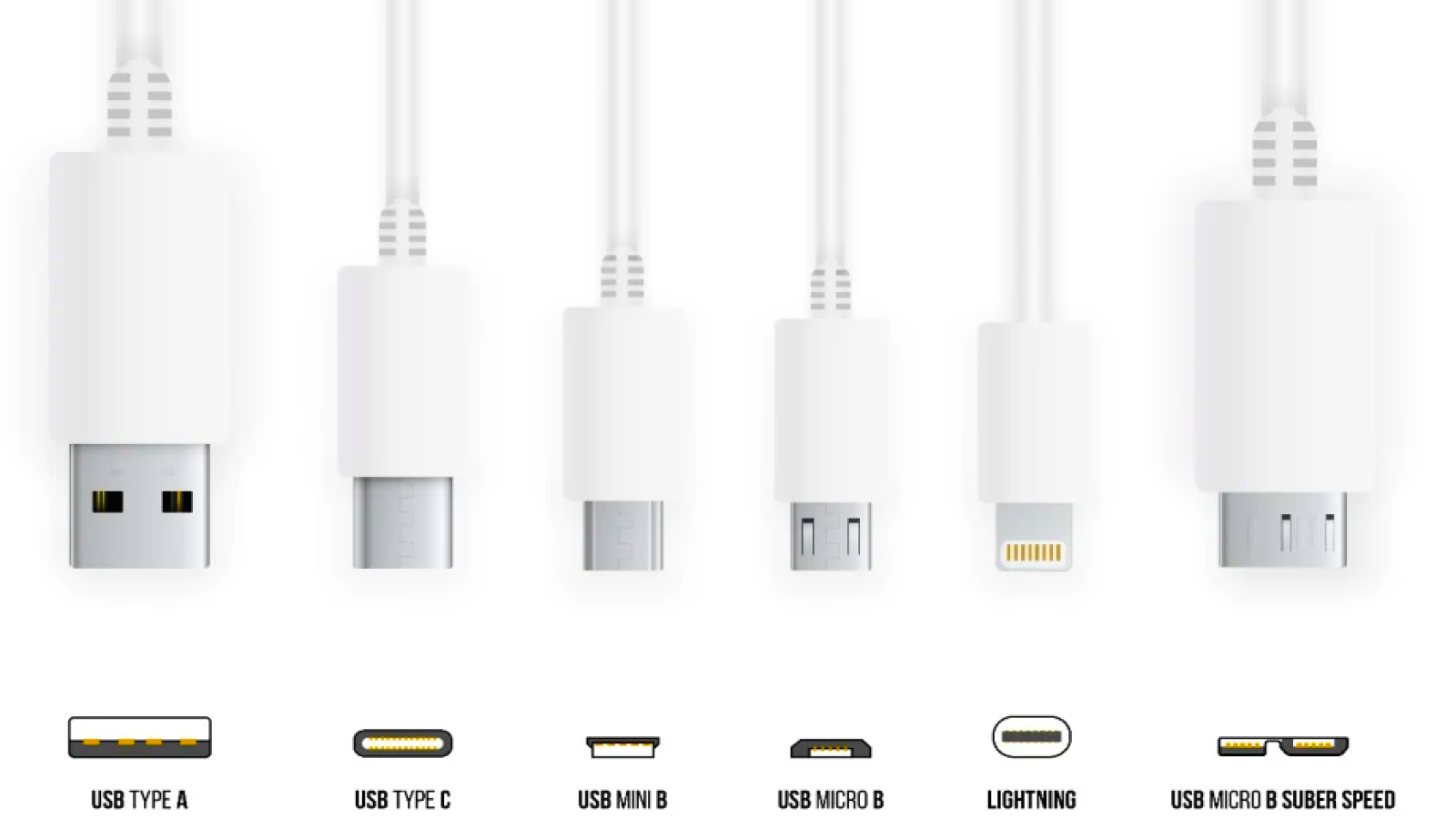
USB types (A, B, C, Micro, Mini) explained
1. USB Type-A: The classic standard
USB Type-A, also known as Standard-A, is the most recognizable and widely used USB connector. It has been the go-to standard for computers, laptops, and various electronic devices for over two decades.
Key features of USB Type-A:
- Rectangular shape with a distinct top and bottom
- Non-reversible design (can only be inserted one way)
- Available in USB 1.1, 2.0, 3.0, 3.1 and 3.2 versions
- Backward compatible with older versions
Common applications:
- Computer peripherals (keyboards, mice, printers)
- External hard drives
- USB flash drives
- Charging cables for various devices
For wholesale buyers looking to source USB Type-A products, Global Sources offers a wide range of suppliers specializing in USB-A cables, connectors, and related accessories. The platform provides access to reliable manufacturers and competitive pricing for bulk orders.
2. USB Type-B: The squared connector
USB Type-B connectors are less common than Type-A but still play a crucial role in certain applications. They are typically found on larger peripherals and devices that require a more secure connection.
Key features of USB Type-B:
- Square shape with slightly beveled corners
- Non-reversible design
- Available in USB 1.1, 2.0, 3.0, 3.1 and 3.2 versions
- Larger and more robust than Type-A connectors
Common applications:
- Printers
- External hard drives
- Audio interfaces
- Some musical instruments
While USB Type-B connectors are less prevalent in consumer electronics, they remain essential for specific industries. Wholesale buyers can find a variety of USB Type-B products and suppliers through Global Sources' extensive network of manufacturers.
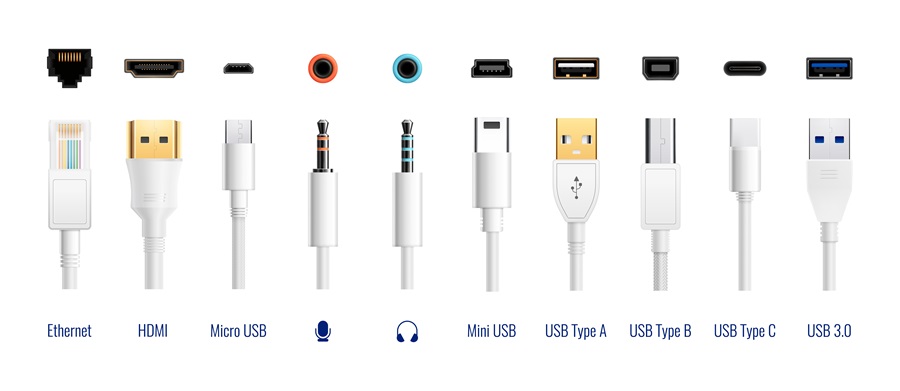
3. USB Type-C: The future of connectivity
USB Type-C, introduced in 2014, has rapidly gained popularity due to its versatility and improved design. It is becoming the new standard for many modern devices and is expected to replace older USB types in the coming years.
Key features of USB Type-C:
- Symmetrical, oval-shaped connector
- Reversible design (can be inserted either way)
- Supports USB 2.0, 3.0, 3.1, 3.2 and USB4 standards
- Capable of faster data transfer speeds and higher power delivery
Common applications:
- Smartphones and tablets
- Laptops and ultrabooks
- Game consoles (Nintendo Switch, PlayStation 5)
- Monitors and displays
- Power banks and chargers
USB Type-C's versatility and growing adoption make it an essential consideration for both consumers and wholesale buyers. Global Sources offers a comprehensive selection of USB-C products, including cables, adapters, and accessories from reputable manufacturers.
4. Micro-USB: The mobile device standard
Micro-USB connectors gained widespread adoption in the mobile device market, particularly for smartphones and tablets, before the introduction of USB-C.
Key features of Micro-USB:
- Small, rectangular shape with a distinct top and bottom
- Non-reversible design
- Available in USB 2.0 and 3.0 versions
- Compact size suitable for mobile devices
Common applications:
- Older smartphones and tablets
- Bluetooth headphones and speakers
- E-readers
- Portable game consoles
While Micro-USB is gradually being phased out in favor of USB-C, it remains relevant for many existing devices and budget-friendly electronics. Wholesale buyers can still find a wide range of Micro-USB products through Global Sources' platform, catering to various market segments.
5. Mini-USB: The predecessor to Micro-USB
Mini-USB connectors were once popular for mobile devices but have largely been replaced by Micro-USB and USB-C. However, they are still found in some older electronics and niche products.
Key features of Mini-USB:
- Trapezoidal shape with a distinct top and bottom
- Non-reversible design
- Available in USB 2.0 version
- Larger than Micro-USB but smaller than Standard-A
Common applications:
- Older digital cameras
- Some GPS devices
- Older MP3 players
- Certain game controllers
While Mini-USB is less common in modern devices, some industries still rely on this connector type. Wholesale buyers can source Mini-USB products through Global Sources to cater to specific market needs or replacement parts for older devices.
Understanding USB standards and versions
USB standards and versions define the specifications for data transfer, power delivery, and connectivity for USB devices. Here is an overview of the key USB standards and their versions:
1. USB 1.1 (1998)
- Data transfer speed: Up to 12Mbps
- Primarily used for low-bandwidth devices like keyboards and mice
2. USB 2.0 (2000)
- Data transfer speed: Up to 480Mbps
- Widely adopted for various devices and still commonly used today
3. USB 3.0 (2008)
- Data transfer speed: Up to 5 bps
- Introduced the blue color-coding for ports and connectors
4. USB 3.1 Gen 1 (2013)
- Data transfer speed: Up to 5Gbps (same as USB 3.0)
- Rebranding of USB 3.0 with some minor improvements
5. USB 3.1 Gen 2 (2013)
- Data transfer speed: Up to 10Gbps
- Introduced alongside USB Type-C connectors
6. USB 3.2 Gen 1 (2017)
- Data transfer speed: Up to 5Gbps
- Rebranding of USB 3.1 Gen 1
7. USB 3.2 Gen 2 (2017)
- Data transfer speed: Up to 10Gbps
- Rebranding of USB 3.1 Gen 2
8. USB 3.2 Gen 2x2 (2017)
- Data transfer speed: Up to 20Gbps
- Utilizes two lanes of 10Gbps each
9. USB 4 (2019)
- Data transfer speed: Up to 40Gbps
- Based on Thunderbolt 3 protocol
- Backward compatible with USB 3.2 and Thunderbolt 3
Choosing the right USB type for your needs
For consumers and wholesale buyers, selecting the appropriate USB type depends on several factors:
- Device compatibility: Ensure the USB type matches the ports on your devices.
- Data transfer requirements: Consider the speed needed for your applications.
- Power delivery capabilities: USB-C supports higher power delivery, which is crucial for fast charging and powering larger devices.
- Future-proofing: USB-C is becoming the new standard, so investing in USB-C products may offer longer-term compatibility.
- Industry-specific needs: Some industries may require specific USB types for legacy systems or specialized equipment.
Global Sources: Your partner in USB product sourcing
For wholesale buyers looking to source USB products, Global Sources offers a comprehensive platform connecting buyers with reliable manufacturers and suppliers. Their extensive network includes vendors specializing in various USB connectors, cables, adapters, and related accessories.
Benefits of sourcing through Global Sources:
- Verified suppliers: Global Sources thoroughly vets their suppliers to ensure quality and reliability.
- Wide product range: Access a diverse selection of USB products across all types and standards.
- Competitive pricing: Compare offers from multiple suppliers to find the best deals for bulk orders.
- Quality assurance: Many suppliers on the platform offer third-party quality certifications and compliance documentation.
- Market insights: Stay informed about the latest trends and innovations in USB technology through Global Sources' industry reports and analysis.
- Customization options: Many suppliers offer OEM/ODM services for custom USB products tailored to your specific requirements.
- Trade show opportunities: Global Sources organizes electronics trade shows, providing opportunities to meet suppliers in person and explore product samples.
Trends and developments in the USB landscape
Looking ahead, here are some trends and developments to watch in the USB landscape:
- Increased adoption of USB4: As USB4 technology becomes more widespread, we can expect to see a surge in devices and accessories supporting its enhanced capabilities, including faster data transfer speeds and improved video output.
- Power delivery advancements: USB-C's Power Delivery (PD) protocol is likely to see further improvements, enabling even faster charging speeds and higher power output for a wider range of devices.
- Thunderbolt integration: The merging of USB and Thunderbolt technologies will continue, offering users more versatile connectivity options and enhanced performance.
- Wireless USB: While not a direct replacement for wired connections, advancements in wireless USB technology may offer new possibilities for device connectivity and data transfer using ultra-wideband (UWB) technology.
- Smart USB hubs and docks: As more devices adopt USB-C, we can expect to see an increase in intelligent USB hubs and docking stations that offer expanded connectivity options and advanced features.
Conclusion
Understanding the various USB types and their applications is crucial for both consumers and wholesale buyers in today's technology-driven market. From the classic USB-A to the versatile USB-C, each connector type serves specific purposes and caters to different device requirements. As the industry continues to evolve, staying informed about USB standards and emerging technologies is essential for making informed purchasing decisions.
For consumers, knowing the differences between USB types can help in selecting the right cables, adapters, and accessories for their devices. It can also aid in future-proofing their technology investments by opting for more advanced and versatile options like USB-C when possible.
Wholesale buyers, on the other hand, must consider market trends, industry-specific requirements, and long-term compatibility when sourcing USB products. By partnering with reliable suppliers and staying abreast of technological advancements, they can ensure they meet their customers' needs and maintain a competitive edge in the market.
As USB technology continues to advance, we can expect to see further improvements in data transfer speeds, power delivery capabilities, and overall functionality. The ongoing transition towards USB-C as the universal standard is likely to accelerate, with more devices adopting this versatile connector type. However, it's important to note that older USB types will still have a place in the market for years to come, particularly in industries relying on legacy systems or specialized equipment.

