




Telehealth has revolutionized the way healthcare services are delivered, allowing patients to receive medical care remotely through the use of technology. In recent years, telehealth has gained significant popularity, especially in light of the COVID-19 pandemic, as it provides a safe and convenient alternative to face-to-face consultations.
According to a report by Fortune Business Insights, the adoption of telehealth is increasing dramatically, especially in behavioral health, radiology, cardiology, and online consultation. Globally, the telehealth market is expected to grow from $142.96 billion in 2023 to $504.24 billion by 2030, at a CAGR of 19.7 percent during the forecast period.
As telehealth continues to grow, it is crucial for healthcare professionals to equip themselves with the best laptops that can seamlessly support this practice.
Table of Contents
Part 1. 10 Best Laptops for Telehealth
Part 2. Choosing the Best Laptop for Telehealth: A Step-by-Step Guide
Part 3. FAQS: Laptops for Telehealth
Part 1. 10 Best Laptops for Telehealth
In the rapidly evolving field of telehealth, having a reliable and efficient laptop is essential for healthcare professionals. Whether it’s for conducting virtual consultations, managing patient records, or collaborating with colleagues, a high-performance laptop can significantly enhance telehealth experience.
In this article, we present the 10 best laptops for telehealth in 2023, equipped with powerful processors, ample memory, fast storage, and vibrant displays. These laptops offer seamless connectivity, user-friendly interfaces, and robust operating systems, ensuring smooth operations for healthcare providers – effectively creating a wishlist of features and capabilities for sourcing professionals looking for laptops to serve the telehealth market.
Lenovo ThinkPad T16
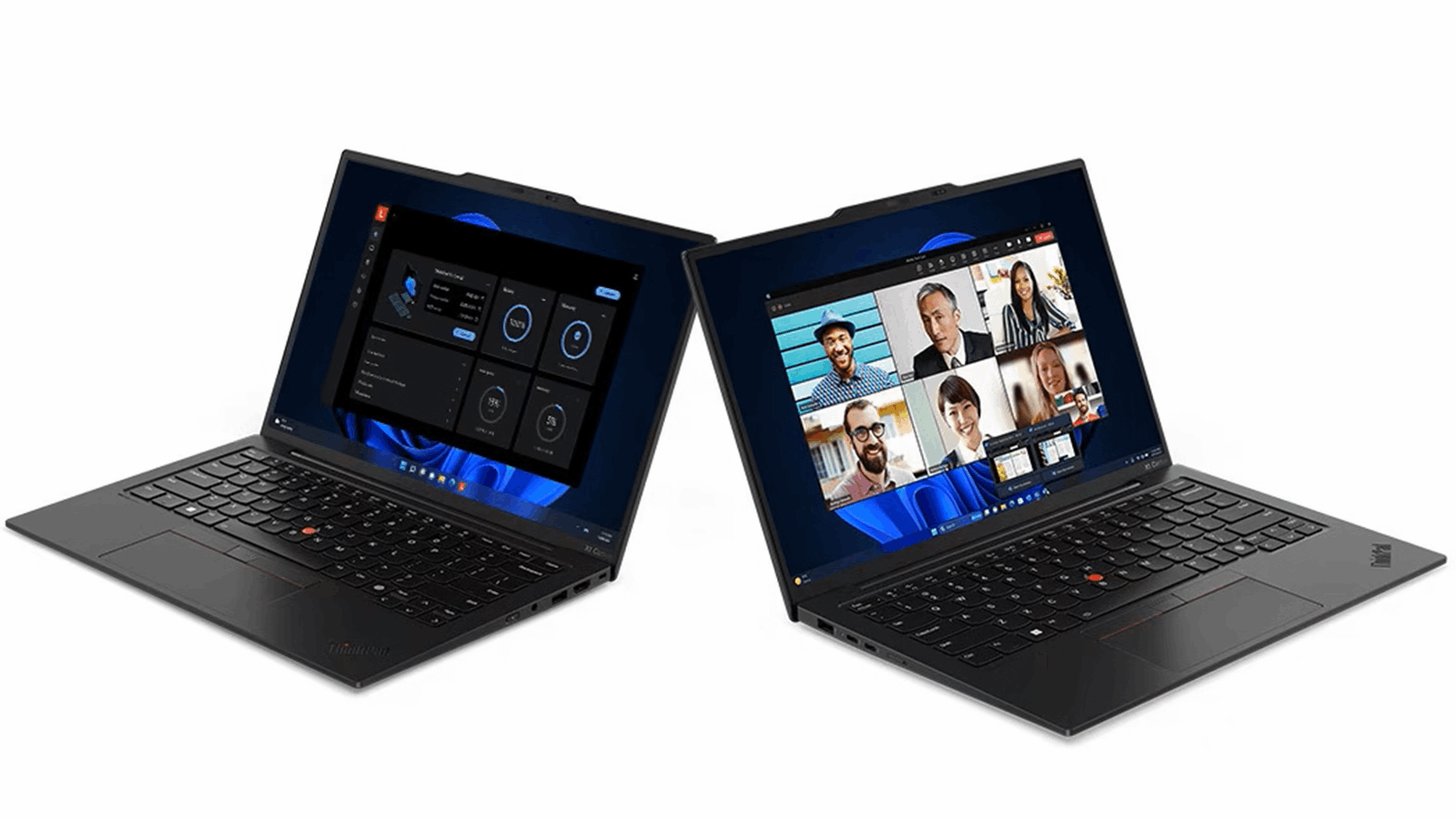
- Available with Intel Core i5-12500H or i7-12700H processor
- Options for 8GB or 16GB DDR5 memory and 256GB or 512GB PCIe SSD storage
- 16" WQXGA IPS anti-glare display
- Runs on Windows 11 Pro
- Robust build quality and reliable performance
The Lenovo ThinkPad T16 is a top choice for telehealth professionals who require a reliable and powerful device. This laptop is available with either an Intel Core i5-12500H or i7-12700H processor, ensuring smooth multitasking and high performance even with resource-intensive applications.
With options for 8GB or 16GB DDR5 memory and 256GB or 512GB PCIe SSD storage, it provides ample space for storing patient data securely. The 16" WQXGA IPS anti-glare display offers crisp visuals and wide viewing angles, making it ideal for reviewing medical images and records during virtual consultations.
Running on Windows 11 Pro, the ThinkPad T16 offers enhanced security features and a user-friendly interface, optimizing telehealth workflow. Its robust build quality, excellent keyboard, and reliable performance make it a trusted choice for healthcare professionals.
Lenovo IdeaPad
- Options for Intel Core i5-1135G7 or i7-1165G7 processor
- 8GB or 16GB LPDDR4x memory and 256GB or 512GB PCIe SSD storage
- 6" full HD IPS anti-glare display
- Runs on Windows 11 Home
- Sleek design and lightweight construction
The Lenovo IdeaPad strikes a balance between affordability and performance, making it a popular choice for telehealth professionals. With options for an Intel Core i5-1135G7 or i7-1165G7 processor, this laptop delivers efficient multitasking capabilities.
The 8GB or 16GB LPDDR4x memory and 256GB or 512GB PCIe SSD storage provide sufficient space for storing patient files and running essential applications. The 15.6" Full HD IPS anti-glare display ensures clear visuals and wide viewing angles, enhancing your telehealth experience.
Running on Windows 11 Home, the IdeaPad offers a user-friendly interface and seamless integration with other Windows devices, enabling smooth collaboration and data transfer. Its sleek design, lightweight construction, and long battery life make it a portable option for healthcare professionals on the go.
Apple MacBook Air
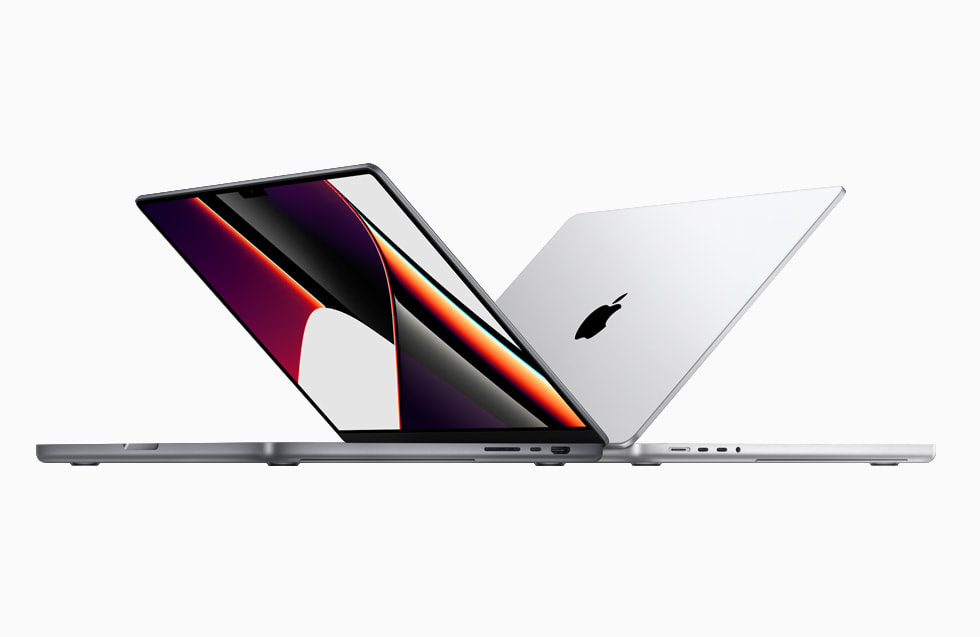
- Powered by Apple M1 chip
- Options for 8GB or 16GB unified memory and 256GB or 512GB SSD storage
- 3" Retina display with 2560x1600 resolution
- Runs on macOS Monterey
- Sleek design, long battery life, and seamless integration with hardware and software
The MacBook Air, powered by the Apple M1 chip, combines power and efficiency for telehealth professionals who prefer the macOS ecosystem. With options for 8GB or 16GB unified memory and 256GB or 512GB SSD storage, this laptop offers fast and reliable performance.
The 13.3" Retina display with a resolution of 2560x1600 provides sharp visuals and accurate color reproduction, crucial for accurate diagnosis and virtual consultations. The macOS Monterey operating system ensures a seamless and intuitive user experience, with optimized performance and advanced security features.
Its sleek design, long battery life, and silent operation make it an excellent choice for telehealth professionals who value style, portability, and the seamless integration of hardware and software.
LG Gram 17Z90P
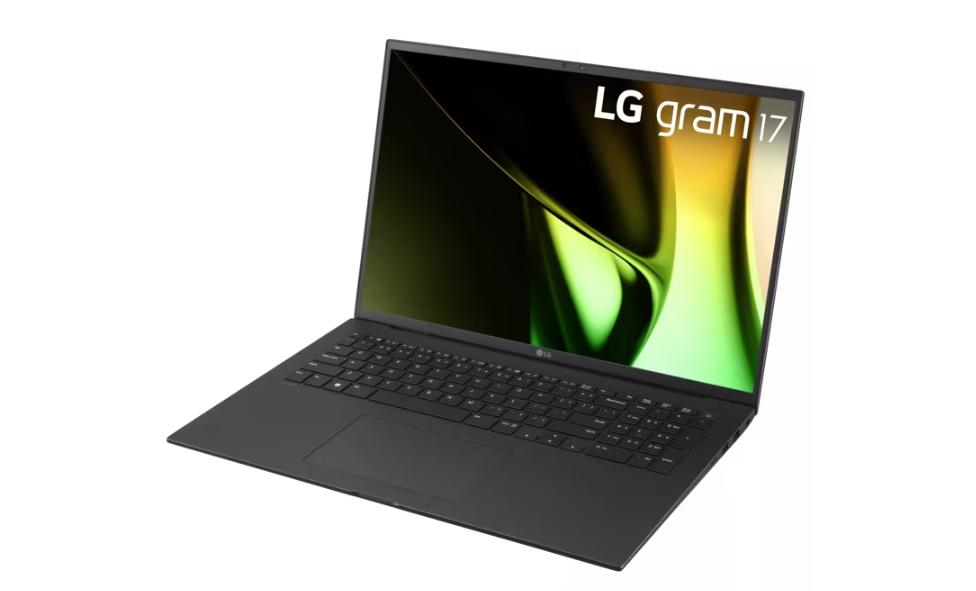
- Intel Core i7-1165G7 processor
- 16GB LPDDR4x memory and 512GB PCIe SSD storage
- 3" WQXGA IPS anti-glare display
- Runs on Windows 11 Home
- Lightweight and portable, with impressive battery life
The LG Gram 17Z90P combines a large display with portability, making it ideal for telehealth professionals who require a spacious workspace on the go. Equipped with an Intel Core i7-1165G7 processor, 16GB LPDDR4x memory, and a 512GB PCIe SSD, this laptop offers powerful performance and fast data access.
The 17.3" WQXGA IPS anti-glare display delivers stunning visuals with a resolution of 2560x1600, providing ample screen real estate for multitasking and reviewing medical records. Running on Windows 11 Home, the LG Gram 17Z90P provides a familiar interface and seamless integration with other Windows devices.
Despite its large display, this laptop remains lightweight and portable, weighing just under three pounds. Its impressive battery life ensures uninterrupted productivity throughout the day, making it an excellent choice for healthcare professionals who need a combination of performance and portability.
HP Pavilion 17
- Options for Intel Core i5-1135G7 or i7-1165G7 processor
- 8GB or 16GB DDR4 memory and 256GB or 512GB PCIe SSD storage
- 3" full HD IPS anti-glare display
- Runs on Windows 11 Home
- Stylish design and backlit keyboard
The 2022 HP Pavilion 17 is a laptop computer that offers a blend of power and affordability, making it an attractive option for telehealth professionals on a budget. With options for an Intel Core i5-1135G7 or i7-1165G7 processor, this laptop ensures smooth multitasking and responsive performance.
The 8GB or 16GB DDR4 memory and 256GB or 512GB PCIe SSD storage provide ample space for storing patient files and running resource-intensive applications. The 17.3" full HD IPS anti-glare display offers vibrant visuals, enabling accurate assessment and diagnosis.
Using Windows 11 Home, the HP Pavilion 17 provides a user-friendly interface and seamless integration with other Windows devices. Its sleek design and backlit keyboard make it a stylish and functional choice for healthcare professionals.
Acer Aspire 5 Slim
- Options for Intel Core i5-1135G7 or i7-1165G7 processor
- 8GB or 16GB LPDDR4x memory and 256GB or 512GB PCIe SSD storage
- 6" full HD IPS anti-glare display
- Runs on Windows 11 Home
- Slim and lightweight design, long battery life
The 2022 Acer Aspire 5 Slim offers a budget-friendly laptop option without compromising performance. With options for an Intel Core i5-1135G7 or i7-1165G7 processor, this laptop ensures smooth multitasking and responsiveness.
The 8GB or 16GB LPDDR4x memory and 256GB or 512GB PCIe SSD storage provide sufficient space for storing patient records and running essential applications. The 15.6" full HD IPS anti-glare display offers clear visuals and wide viewing angles, optimizing your telehealth experience.
Running on Windows 11 Home, the Acer Aspire 5 Slim provides a familiar and user-friendly interface. Its slim and lightweight design, coupled with a long battery life, makes it a portable choice for telehealth professionals on the move.
Razer Blade 15 Gaming Laptop
- Intel Core i7-12700H processor
- 16GB or 32GB DDR5 memory and 512GB or 1TB PCIe SSD storage
- 6" QHD IPS 165Hz display
- Runs on Windows 11 Home
- Powerful performance, customizable RGB keyboard, and impressive cooling system
Although primarily marketed as a gaming laptop, the Razer Blade 15 also serves as a powerful tool for telehealth professionals. Powered by an Intel Core i7-12700H processor and equipped with 16GB or 32GB DDR5 memory and a 512GB or 1TB PCIe SSD, this laptop delivers exceptional performance.
The 15.6" QHD IPS 165Hz display offers vibrant visuals with a high refresh rate, ideal for reviewing medical images and records. Installed with Windows 11 Home, the Razer Blade 15 provides a seamless and intuitive user experience. Its sleek design, customizable RGB keyboard, and excellent cooling system make it an appealing choice for healthcare professionals seeking a powerful and visually impressive laptop.
HP Envy x360 2-in-1
- Options for Intel Core i5-1135G7 or i7-1165G7 processor
- 8GB or 16GB LPDDR4x memory and 256GB or 512GB PCIe SSD storage
- 3" full HD IPS touchscreen display with stylus support
- Runs on Windows 11 Home
- Versatile 2-in-1 design, suitable for note-taking and collaboration
The HP Envy x360 2-in-1 combines versatility with performance, catering to the needs of telehealth professionals. With options for an Intel Core i5-1135G7 or i7-1165G7 processor, this laptop ensures efficient multitasking and responsive performance.
The 8GB or 16GB LPDDR4x memory and 256GB or 512GB PCIe SSD storage offer ample space for storing patient files and running essential applications. The 13.3" full HD IPS touchscreen display supports stylus input, enabling precise annotations and note-taking during virtual consultations.
Running on Windows 11 Home, the HP Envy x360 provides a user-friendly interface and seamless integration with other Windows devices. Its 2-in-1 design allows for versatile usage modes, including tablet mode for convenient note-taking or collaboration with patients.
Dell Inspiron 15 3000
- Intel Core i5-1135G7 processor
- 8GB or 16GB DDR4 memory and 256GB or 512GB PCIe SSD storage
- 6" full HD IPS anti-glare display
- Runs on Windows 11 Home
- Reliable and affordable option
The Dell Inspiron 15 3000 15.6-inch laptop offers a budget-friendly option with reliable performance for telehealth professionals. Powered by an Intel Core i5-1135G7 processor and equipped with 8GB or 16GB DDR4 memory and a 256GB or 512GB PCIe SSD, this laptop ensures smooth multitasking and quick data access. The 15.6" full HD IPS anti-glare display delivers vibrant visuals, enhancing the telehealth experience.
Running on Windows 11 Home, the Dell Inspiron 15 3000 provides a familiar and user-friendly interface. Its durable construction and comfortable keyboard make it a practical choice for healthcare professionals who require a reliable and affordable laptop.
ASUS Chromebook Flip C434 2-In-1
- Intel Core m3-8100Y processor
- 8GB LPDDR3 memory and 64GB eMMC storage
- 14" full HD IPS touchscreen display with stylus support
- Runs on Chrome OS
- Lightweight and portable, with seamless integration with Google services
The ASUS Chromebook Flip C434 2-In-1 laptop offers a lightweight and versatile option for telehealth professionals. Powered by an Intel Core m3-8100Y processor and equipped with 8GB LPDDR3 memory and a 64GB eMMC storage, this Chromebook ensures smooth performance for web-based telehealth applications.
The 14" full HD IPS touchscreen display provides sharp visuals and supports stylus input, enabling precise annotations and note-taking during virtual consultations. Running on Chrome OS, the ASUS Chromebook Flip C434 offers seamless integration with Google services and a streamlined interface designed for online productivity.
Its 2-in-1 design, long battery life, and portable form factor make it an excellent choice for telehealth professionals who value flexibility and mobility. Besides, C434 stands out with its timeless aesthetic that will never fade, thanks to its lightweight (3lbs) all-aluminum construction, which not only adds durability but also enhances its beauty.
 Tips: Finding Laptops for Telehealth on Global Sources
Still searching for a reputable online marketing platform to source from? Global Sources is a reliable platform for online sellers looking for trusted suppliers. Its blend of digital and traditional sourcing channels empowers businesses to thrive in today's dynamic marketplace.
As one of the world's largest facilitators of business-to-business (B2B) trade for over 50 years, Global Sources has provided buyers all over the world access to hot new products, as well as qualified B2B lead generation to China manufacturers. With a remarkable track record, it has served over 10 million registered buyers and users worldwide, including 97 of the world's top 100 retailers. It also caters to online sellers across various platforms, including Amazon, Temu, Wish, eBay, Shein, Walmart, and Etsy, and boasts a roster of trusted suppliers from countries like China, Vietnam, South Korea, and India, ensuring diverse sourcing options.
Global Sources provides a comprehensive solution for buyers, showcasing products online and organizing offline trade shows through its Online-to-Offline (O2O) feature. This innovative approach enables users to discover the best-suited suppliers across all industries, guaranteeing access to hot new products and verified manufacturers in different sectors.
By leveraging Global Sources' extensive network, you can confidently explore tens of thousands of wholesale products on GlobalSources.com, effectively meeting all your sourcing needs and gaining a competitive edge in your business endeavors.
You May also Like: Specialty Laptops and Accessories
- Laptops for Crafting
- Dropshipping Laptops
- Telehealth Laptops
- Revit Laptops
- Cricut Maker Laptops
- Small Business Laptops
- Laptops for Multiple Monitors
- Charging Laptop Batteries Externally
- Stylish Puffy Laptop Sleeves
- Western Laptop Bags
Part 2. Choosing the Best Laptop for Telehealth: A Step-by-Step Guide
Amidst the rapid advancements in healthcare technology, the rise of telehealth has transformed the way we access medical services. With virtual consultations becoming the new norm, finding the perfect laptop to support this digital healthcare era has become a crucial task. But fret not! Don't let the overwhelming array of options discourage you.
From picking the operating system to evaluating hardware specifications, this step-by-step guide will assist you in making an informed decision.
Operating System
The operating system (OS) of a laptop plays a significant role in determining its functionality, software compatibility, and user experience. There are three primary options to consider:
1. Windows
Windows laptops offer a wide range of compatibility with telehealth software, along with a vast software library. They are versatile and widely supported, making them a popular choice for telehealth practitioners.
2. macOS
Apple's macOS offers a seamless user experience with optimized performance and built-in security features. MacBooks are known for their sleek design, reliability, and excellent battery life, making them suitable for telehealth professionals who prefer Apple's ecosystem.
3. Linux
Linux-based laptops are preferred by users who value customization, security, and open-source software. While Linux requires more technical expertise, it can be an excellent choice for telehealth practitioners who prefer a highly customizable and secure environment.
CPU
The central processing unit (CPU) determines the laptop's processing power and multitasking capabilities. When selecting a laptop for telehealth, consider the following CPU specifications:
Core Count
Look for laptops with multi-core CPUs, such as quad-core or hexa-core processors. Higher core counts allow for smoother multitasking, essential when running telehealth software alongside other applications.
Clock Speed
Higher clock speeds translate to faster processing, resulting in smoother video conferencing and quicker application response times. Aim for a CPU with a higher base clock speed to ensure efficient performance.
Graphics Cards
While telehealth does not typically require powerful graphics cards, they can enhance the overall visual experience. Consider the following factors when evaluating the graphics card:
Integrated Graphics vs. Dedicated Graphics
Integrated graphics, found in most laptops, are sufficient for telehealth applications. However, for resource-intensive imaging software or graphics-heavy applications, consider laptops with dedicated graphics cards for improved performance.
Video RAM (VRAM)
For advanced imaging or visualization tools, choose a laptop with a graphics card that has dedicated video memory (VRAM). Higher VRAM capacity ensures smoother rendering and enhanced performance for graphically demanding tasks.
Processor
The processor is the brain of a laptop, responsible for executing tasks efficiently. Take into account the following specifications when choosing a processor:
Brand and Model: Look for reputable brands such as Intel or AMD. Consider the latest generation processors as they offer improved performance and power efficiency.
Minimum Recommended Specifications: For telehealth, a processor with at least four cores and a clock speed of 2.5GHz or higher should suffice. However, for simultaneous resource-intensive tasks, consider a higher-end processor.
RAM
Random Access Memory (RAM) affects the laptop's ability to handle multiple applications simultaneously. Follow these guidelines when considering the RAM capacity:
Minimum Recommended RAM: Aim for a minimum of 8GB of RAM to ensure smooth multitasking during telehealth sessions. This capacity should be sufficient for running telehealth software and other essential applications simultaneously.
Advanced Requirements: For running memory-intensive applications or handling large datasets, consider laptops with 16GB or more RAM to ensure optimal performance.
Storage
Storage space determines the amount of data that can be stored on a laptop. Consider the following factors when evaluating storage options:
Solid State Drive (SSD): Opt for laptops with SSDs instead of traditional hard disk drives (HDDs). SSDs offer faster boot times, quicker data access, and improved overall performance.
Storage Capacity: For telehealth purposes, a laptop with at least 256GB of storage should be sufficient. If For storing a large number of medical records, images, or videos, consider laptops with 512GB or higher storage capacity.
Ports
Having the necessary laptop ports is essential for connecting external devices. Consider the following ports:
USB Ports: Ensure the laptop has an adequate number of USB ports to connect peripherals such as webcams, microphones, and external storage devices. USB 3.0 or higher ports offer faster data transfer speeds.
HDMI/DisplayPort: Verify if the laptop has an HDMI or DisplayPort to connect to external monitors or projectors for enhanced display options during telehealth sessions.
Webcam
Given the remote nature of telehealth, having a high-quality webcam is vital. Consider the following features:
Webcam Quality: Look for laptops with HD or full HD webcams for clear and sharp video conferencing. Some laptops offer advanced features like auto-focus and noise reduction, enhancing the overall video quality.
Audio: Consider laptops with built-in noise-canceling microphones to ensure crystal-clear audio during telehealth sessions. External microphones or headsets can also be used if necessary.
Security Features
Privacy and data security are paramount in telehealth. Look for laptops that offer robust security features like biometric authentication (fingerprint or facial recognition) and encrypted storage. Some laptops also have dedicated hardware for secure storage and encryption. Additionally, ensure the laptop receives regular software updates to mitigate potential security vulnerabilities.
Make Your Choice
Once you have considered all the factors mentioned above, it's time to make your choice. Consider your budget, prioritize the features that align with your telehealth needs, and select a laptop that offers a balance between performance, portability, and battery life.
You May also Like: Laptops for Specific Needs
- Laptops for Ableton Live
- Travel-Friendly Laptops
- Homeschool Laptops
- Laptops for Cryptocurrency
- Car Tuning Laptops
- Cybersecurity Laptops
- Podcasting Laptops
- Fusion 360 Laptops
- Laptops with Best Speakers
- College Student Laptops
Part 3. FAQS: Laptops for Telehealth
What laptops are good for teletherapy?
When it comes to teletherapy, it's important to have a reliable and powerful laptop. Two great options to consider are the Lenovo ThinkPad T16 and the Apple MacBook Air. The ThinkPad T16 offers a choice between Intel Core i5-12500H or i7-12700H processors, ample memory, and storage options, along with a vibrant display and enhanced security features.
The MacBook Air, powered by the Apple M1 chip, combines power and efficiency, with options for unified memory and fast SSD storage, ensuring smooth performance for teletherapy sessions.
What kind of laptop is ideal for remote work?
For remote work, choose a laptop that offers a balance of performance, portability, and connectivity. The Lenovo IdeaPad and the LG Gram 17Z90P are two excellent options.
The IdeaPad provides options for Intel Core i5-1135G7 or i7-1165G7 processors, sufficient memory, and storage capacity, along with a clear display and a user-friendly interface. The LG Gram 17Z90P combines a large 17.3" display with portability, powered by an Intel Core i7-1165G7 processor, and offering ample memory and storage, making it ideal for remote work.
What processor is best for telehealth?
When it comes to processors for telehealth, it's important to consider multitasking capabilities and processing power. The Intel Core i5-12500H and i7-12700H processors found in the Lenovo ThinkPad T16 are excellent choices.
These processors offer smooth multitasking and high performance, ensuring that resource-intensive telehealth applications run seamlessly. The higher core counts and clock speeds of these processors provide efficient processing for telehealth tasks, such as video conferencing and managing patient data.
What laptop is best for work from home call center?
For work from home call center, a laptop that combines performance, reliability, and connectivity is the best choice. The Lenovo ThinkPad T16 and the Razer Blade 15 gaming laptop are two options worth considering.
The ThinkPad T16 offers powerful processors, ample memory, and storage options, along with a user-friendly interface and enhanced security features. The Razer Blade 15, while primarily marketed as a gaming laptop, also delivers exceptional performance with its Intel Core i7-12700H processor, fast memory, and storage, making it suitable for work from home call center.
Part 4. Conclusion
Selecting the best laptop for telehealth is a critical decision that can greatly impact the quality of care provided to patients. Considering factors such as webcam quality, processing power, and budget can help healthcare professionals make an informed choice. Whether you opt for a performance-based laptop or a budget-friendly option, prioritizing the specific needs of telehealth consultations will ensure a smooth and effective healthcare experience for both practitioners and patients.
You May also Like: General Laptop Guides and Comparisons

